
GeoGebra Geometric Construction and Calculus Application
Loading the math board and drawing, please wait…
In collections
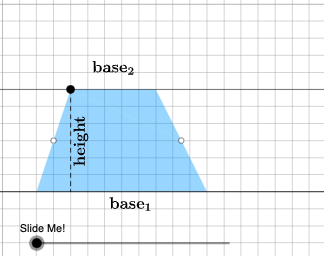
Area of a Trapezoid: Intuitive Discovery
This example demonstrates the integration of geometric figures and calculus concepts to illustrate area calculation and slope analysis. Key mathematical concepts include polygon area, linear functions, slope, and median value. Construction involves using GeoGebra commands like Point, Polygon, OrthogonalLine, and Dilate to build the figure, with dynamic adjustments via Rotate and other transformations. Suitable for high school students or college undergraduates to enhance understanding of geometric transformations and function relationships.
GeoGebra Commands & Parameters
Point(Ray[A, A + (1, 0)]) → BPointIn(d) → CPolygon(A, B, C) → t1, f, a, bOrthogonalLine(C, g) → hIntersect(g, h) → C_{1}Point(Ray[C, C + (1, 0)]) → DDilate(C, If[0 < c ≤ 1, 1 - c, 0], D) → F'Dilate(D, If[1 < c ≤ 2, 2 - c, 0], C_{1}) → D'Rotate(C, If[2 < c ≤ 3, ((c - 2) * pi), pi], D) → F'_{1}Rotate(F', If[2 < c ≤ 3, ((c - 2) * pi), pi], D) → F''Angle(C, B, A) → βAngle(B, A, C) → γIf(γ ≟ pi / 2, 12, 16) → oMidpoint(B, D) → EPolygon(A, B, E, C) → q1, a_1, b_1, e, c_1Polygon(E, D, C) → t2, c_2, e_1, d_1Dilate(D, If[0 < c ≤ 1, 1 - c, 0], E) → D'_{1}Segment(D, D'_{1}) → iRotate(D, If[1 < c ≤ 2, ((-(c - 1)) * pi), (-pi)], E) → D'_{2}Rotate(D'_{1}, If[1 < c ≤ 2, ((c - 1) * pi), pi], E) → FSegment(D'_{2}, F) → i'Segment(C, D) → jSegment(A, C) → kDilate(C, If[2 < c ≤ 3, 3 - c, 0], E) → C'Segment(C, C') → lRotate(E, If[4 < c ≤ 5, ((-(c - 4)) * pi), (-pi)], E) → E'Rotate(D, If[4 < c ≤ 5, ((-(c - 4)) * pi), (-pi)], E) → D'_{3}Rotate(C, If[4 < c ≤ 5, ((-(c - 4)) * pi), (-pi)], E) → C'_{1}Polygon(E', D'_{3}, C'_{1}) → t2', c'_{1}, e', d'_{3}Segment(C'_{1}, D'_{3}) → mSegment(D'_{3}, E) → nSegment(C'_{1}, E) → pAngle(E, C'_{1}, D'_{3}) → αOrthogonalLine(C, g) → qIntersect(g, q) → GMidpoint(C, G) → HDilate(C, If[6 < c ≤ 7, 7 - c, 0], H) → C'_{2}Segment(C, C'_{2}) → rDilate(H, If[7 < c ≤ 8, 8 - c, 0], G) → H'Segment(H, H') → sRotate(C, If[8 < c ≤ 9, ((-(c - 8)) * pi), (-pi)], H) → C'_{3}Rotate(C'_{2}, If[8 < c ≤ 9, ((-(c - 8)) * pi), (-pi)], H) → ISegment(C'_{3}, I) → r'Midpoint(k) → JDilate(E, If[9 < c ≤ 10, 10 - c, 0], H) → E'_{1}Dilate(J, If[9 < c ≤ 10, 10 - c, 0], H) → J'Segment(J, J') → tSegment(E, E'_{1}) → f_1Polygon(A, C'_{1}, E, J) → q2, a_2, g_1, e_2, j_1Polygon(E, C, J) → t3, j_2, e_3, c_3Rotate(E, If[11 < c ≤ 12, ((-(c - 11)) * pi), (-pi)], E) → E'_{2}Rotate(C, If[11 < c ≤ 12, ((-(c - 11)) * pi), (-pi)], E) → C'_{4}Rotate(J, If[11 < c ≤ 12, ((-(c - 11)) * pi), (-pi)], E) → J'_{1}Polygon(E'_{2}, C'_{4}, J'_{1}) → t3', j'_{1}, e'_{2}, c'_{4}Segment(J'_{1}, C'_{4}) → h_1Segment(C'_{4}, E) → i_1Segment(E, J'_{1}) → k_1Segment(A, J) → l_1Segment(J, C) → m_1OrthogonalLine(C'_{1}, g) → n_1Intersect(n_1, p_1) → KOrthogonalLine(J'_{1}, g) → q_1Intersect(q_1, g) → LDilate(J'_{1}, If[13 < c ≤ 14, 14 - c, 0], L) → MSegment(J'_{1}, M) → r_1Dilate(C'_{1}, If[13 < c ≤ 14, 14 - c, 0], K) → NSegment(C'_{1}, N) → s_1Polygon(A, L, J'_{1}, J) → q3, a_3, l_2, t_1, j_3Polygon(L, C'_{1}, J'_{1}) → t4, f_2, l_3, g_2Dilate(J'_{1}, If[15 < c ≤ 16, 16 - c, 0], J) → OVector(J'_{1}, O) → uTranslate(L, u) → L'Translate(C'_{1}, u) → PTranslate(J'_{1}, u) → QPolygon(L', P, Q) → t4', q_2, l', p_2Segment(P, O) → h_2Segment(O, L') → i_2Polygon(A, C'_{1}, K, J) → q4, a_4, k_2, k_3, j_4Polygon(C'_{1}, J'_{1}, K) → t5, k_4, m_2, n_2Translate(C'_{1}, u) → RTranslate(J'_{1}, u) → STranslate(K, u) → K'Polygon(R, S, K') → t5', k', r_2, s_2Segment(R, Q) → t_2Segment(R, K') → b_2Point(f_3) → TIntersect(eq1, Line[A, B]) → USegment(T, U) → d_2Midpoint(A, B) → VMidpoint(C, D) → WRotateText(text2, pi / 2) → text4Midpoint(D'_{3}, C'_{1}) → ZRotateText(text3, (-((pi * (c - 5))))) → text5
AI Drawing Prompt Reference
Draw a triangle ABC with point A at the origin, point B on the x-axis, and point C in the first quadrant. Construct a line h perpendicular to a given line g through point C, intersecting at C₁. Then, rotate point D around point C using the Dilate command to create a series of dynamic polygons and segments, including t1, f, a, b, q1, a_1, b_1, e, c_1, t2, c_2, e_1, d_1, t2', c'_{1}, e', d'_{3}, etc. Finally, generate more segments and polygons through rotations and scaling, such as i, j, k, l, m, n, p, r, s, t, r', f_1, to illustrate geometric transformations and function relationships.
The prompt above was compiled from the original drawing commands and is for reference only.