
Pointless Jactus Geometry Construction
Loading the math board and drawing, please wait…
In collections
About Exponents
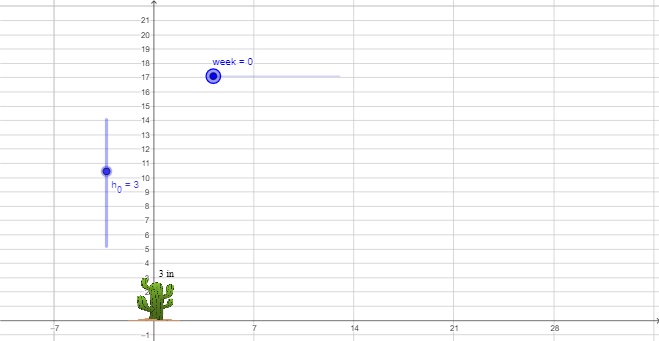
This GeoGebra example demonstrates how to build and visualize a geometric “Jactus” structure without relying on explicit plotted points, instead using parameter-driven construction of polygonal components. The key mathematics includes geometric construction of polygons, arithmetic decision logic via Max (to choose or scale dimensions), and parameter relations indicated by root/calculus-related symbols (used to control lengths or functional dependencies). Construction-wise, it uses the GeoGebra commands Max and Polygon, along with many intermediate variables and length parameters (e.g., width, h_0, days, arm length/height-like terms) and auxiliary entities (A, E, F, D, D_1, E1, E2, B, C, B2, D2, B3, C1, C2). The model is assembled through polygon objects such as poly1 and poly2, while expression variables (f, f_1, and numerous c/e/d/a/b terms) drive the evolving geometry. Suitable for senior high school through introductory university geometry/GeoGebra lessons, especially for parameterized constructions and expression-based modeling.
GeoGebra Commands & Parameters
Max(width / 6, Min[{width / 2, ((width * days)) / 6, h_0 / 3}]) → armhtPolygon(F, C2, D_1, D, D2, B3, E2, E, E1, C1, C, A, B, B2) → poly1, f, b2, d_1, d, d2, b3, c2, e2, e, e1, c1, c, a, bPolygon(F, C2, C, B, B3) → poly2, f_1, c2_1, c_1, b_1, b3_1
AI Drawing Prompt Reference
Construct a geometric structure composed of multiple polygons. First, create a polygon with vertices F, C2, D1, D, D2, B3, E2, E, E1, C1, C, A, B, B2, where the lengths of D1, D2, E1, E2, C1, C2, B3, and B2 are controlled by parameters. Then, create another polygon with vertices F, C2, C, B, B3. The entire structure can be adjusted by changing the parameters width, days, and h_0 to alter its shape and size.
The prompt above was compiled from the original drawing commands and is for reference only.