
Calculus and Polygon Geometry Example
Loading the math board and drawing, please wait…
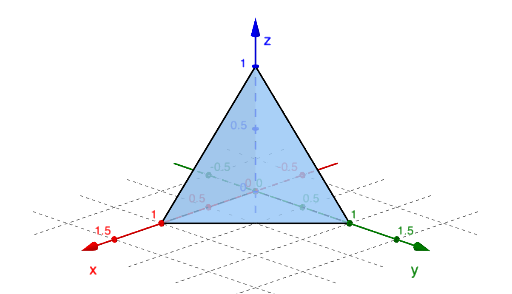
This example demonstrates how to construct polygons (like trapezoids, kites) and analyze their geometric properties and calculus relationships using GeoGebra; core concepts include rational numbers, polynomial functions, fractions, derivatives, integrals, and limits; construction highlights from the summary involve commands/objects like Point, Polygon, Intersect, Element, Plane, Line, LaTeX; suitable for high school and above for calculus and geometry integration teaching.
GeoGebra Commands & Parameters
Point(xAxis) → APoint(yAxis) → BPoint(zAxis) → CPolygon(A, B, C) → t1, c, a, bIntersect(yAxis, zAxis) → DPolygon(A, D, B) → t2, b_1, a_1, dPolygon(D, C, A) → t3, a_2, d_1, c_1Polygon(D, B, C) → t4, c_2, d_2, b_2Element(vdir, faces) → SelectvecPlane(yAxis, zAxis) → qPlane(xAxis, zAxis) → rLine((0, 0, 1), (0, 1, 0)) → kLine((0, 0, 1), (1, 0, 0)) → lLaTeX(faces, true, true) → text1
AI Drawing Prompt Reference
Draw a triangle formed by points A, B, and C, where A is on the x-axis, B on the y-axis, and C on the z-axis. Then, using the intersection point D of the y-axis and z-axis, draw polygons such as t2, t3, and t4 involving A, D, B, and other points. Also, create planes q formed by the y-axis and z-axis, and plane r formed by the x-axis and z-axis. Finally, draw lines k and l. The construction should start from points and proceed to build polygons, planes, and lines.
The prompt above was compiled from the original drawing commands and is for reference only.