
Interactive Area Model for Fraction Multiplication
Loading the math board and drawing, please wait…
In collections
Primary School Mathematics Collection
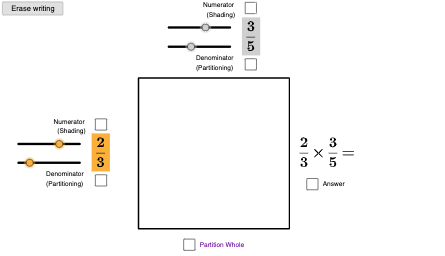
This example demonstrates fraction multiplication using a square area model: it shows how multiplying two common fractions corresponds to the area of a properly partitioned region. Learners can use interactive tools (checkboxes and sliders) to vary the partitioning and immediately see how the resulting area matches the product of the fractions, including the simplified fraction form. The key math concepts are fraction multiplication, area representation (area model), proportional partitioning, and fraction simplification via common factors (e.g., greatest common factor for simplification), with optional function-like parameter control for the geometry. Construction relies on GeoGebra commands such as Intersect (to locate key intersection points), Polygon (to build the segmented regions, including top/bottom or highlighted areas like poly1/polyTopAB/polyBottomCD), Sequence (to manage ordered partition steps and related points), Segment (to draw the partition lines), and Max (to determine boundary or limiting parameters). Objects used include the fraction inputs (frac1, frac2), computed answers (ans), simplified results (simplifiedGCF), and display text/controls (textFracAns, textFracSimpl, ckAns, ckSimpl, ckA–ckD). Suitable for middle school to early high school learners, classroom demonstrations, and interactive exploration of why the area model works.
GeoGebra Commands & Parameters
Intersect(xAxis, yAxis) → APolygon(A, B, 4) → poly1, f, g, h, j, C, DPolygon(A, F, (x(F), y(D)), D) → polyTopAB, i, k, j_1, k_1Polygon(A, F, E, (x(A), y(E))) → polyBottomHatchNotUsed, p, q, r, sMax(Sequence[If[Mod[(a * c), i] + Mod[(b * d), i] ≟ 0, i, -1], i, 1, Min[{(a * c), (b * d)}]]) → simplifiedGCFPolygon(A, F, E, (x(A), y(E))) → polyBottomCD, f_1, polyBottomCDrt, polyBottomCDtop, i_1Sequence(Segment[A + (i, 0), (x(A), y(E)) + (i, 0)], i, (x(B) - x(A)) / b, x(F) - (x(B) - x(A)) / b, (x(B) - x(A)) / b) → partitionsVert2Sequence(Segment[A + (i, 0), D + (i, 0)], i, 0 + (x(B) - x(A)) / b, x(B) - (x(B) - x(A)) / b, (x(B) - x(A)) / b) → partitionsVert1Sequence(Segment[A + (0, i), F + (0, i)], i, 0 + (y(D) - y(A)) / d, y(D) - (y(D) - y(A)) / d, (y(D) - y(A)) / d) → partitionsHorLeft1Sequence(Segment[A + (0, i), F + (0, i)], i, 0 + (y(D) - y(A)) / d, y(E) - (y(D) - y(A)) / d, (y(D) - y(A)) / d) → partitionsHorLeft2Sequence(Segment[A + (0, i), B + (0, i)], i, 0 + (y(D) - y(A)) / d, y(D) - (y(D) - y(A)) / d, (y(D) - y(A)) / d) → partitionsHorWholeSegment(F, (x(F), If[ckA, y(D), y(E)])) → vertBorder
AI Drawing Prompt Reference
Create an interactive area model for multiplying two common fractions. In a coordinate plane, form a rectangle using a shared corner as the base vertex, then partition it with two sets of adjustable lines that split the width and height according to the fraction parameters. Generate the vertical partition segments from the left boundary across the rectangle and the horizontal partition segments downward across the rectangle, creating several polygon regions. Highlight the specific subregions corresponding to the product area (using upper and lower highlighted polygon parts) and draw the key border segment that matches the chosen partition. Include on-canvas text showing both the unsimplified and simplified fraction results, with checkboxes and sliders to vary the partitioning and control which highlighted regions are emphasized.
The prompt above was compiled from the original drawing commands and is for reference only.