
Geogebra Demonstration of Rotational Symmetry
Loading the math board and drawing, please wait…
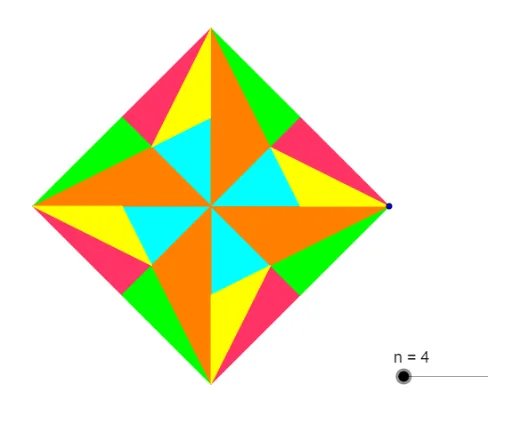
This example dynamically demonstrates the formation and properties of rotationally symmetric figures using GeoGebra. It involves core mathematical concepts such as symmetry, rotational transformation, polygon construction, and parametric control. Key GeoGebra commands and objects used include Circle, Segment, Rotate, Midpoint, Intersect, Polygon, and Sequence. Suitable for high school mathematics teaching to understand rotational symmetry and geometric transformations.
GeoGebra Commands & Parameters
Circle(A, B) → cSegment(A, B) → aRotate(B, θ, A) → B_1Segment(B_1, B) → bMidpoint(A, B) → CMidpoint(B, B_1) → DSegment(A, D) → dSegment(B_1, C) → eIntersect(d, e) → EPolygon(B_1, E, D) → polyG, d_1, b', e_1Polygon(B_1, A, E) → polyO, e_2, b'_1, a_1Polygon(A, C, E) → polyB, e_3, a_2, c_1Segment(E, B) → fPolygon(D, E, B) → polyP, b_1, d_2, e_4Polygon(E, C, B) → polyY, b_2, e_5, c_2Rotate(E, θ, A) → E'Rotate(D, θ, A) → D'Rotate(C, θ, A) → C'Rotate(E, θ, A) → E'_1Sequence(Polygon[Rotate[D, (k * θ), A], Rotate[E, (k * θ), A], Rotate[B, (k * θ), A]], k, 1, n) → pinkSequence(Polygon[Rotate[B_1, (k * θ), A], Rotate[E, (k * θ), A], Rotate[D, (k * θ), A]], k, 1, n) → greenSequence(Polygon[Rotate[A, (k * θ), A], Rotate[C, (k * θ), A], Rotate[E, (k * θ), A]], k, 1, n) → blueSequence(Polygon[Rotate[B_1, (k * θ), A], Rotate[A, (k * θ), A], Rotate[E, (k * θ), A]], k, 1, n) → orangeSequence(Polygon[Rotate[E, (k * θ), A], Rotate[C, (k * θ), A], Rotate[B, (k * θ), A]], k, 1, n) → yellow
AI Drawing Prompt Reference
Draw a dynamic illustration showing the formation of rotationally symmetric figures. Start with a circle and two segments, then rotate the segments around the circle's center at specific angles to create new segments and polygons. Find the midpoints of the segments, connect them to the rotated points, and form additional polygons. Finally, replicate the polygons multiple times at increasing rotation angles to demonstrate the rotational symmetry pattern.
The prompt above was compiled from the original drawing commands and is for reference only.