
Origami, Symmetry & Peace
Loading the math board and drawing, please wait…
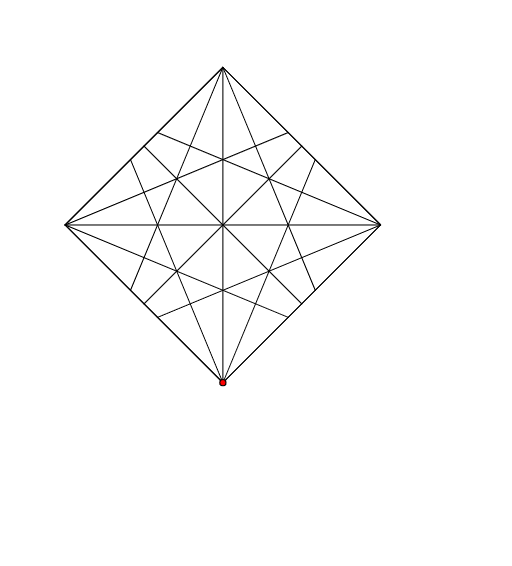
This example explores symmetry through origami art, integrating mathematics with art/craft, history, geography, and citizenship/peace education. It demonstrates how to use GeoGebra commands such as Intersect, Polygon, Midpoint, Segment, and AngularBisector for geometric constructions. Suitable for middle school and above students to learn about symmetry, triangles, polygons, and other geometric concepts.
GeoGebra Commands & Parameters
Intersect(xAxis, yAxis) → APolygon(A, B, 4) → poly1, a, b, c, d, C, DMidpoint(D, C) → EMidpoint(C, B) → FMidpoint(B, A) → GMidpoint(A, D) → HSegment(D, B) → eSegment(C, A) → fSegment(H, F) → gSegment(E, G) → hAngularBisector(B, C, A) → iAngularBisector(A, C, D) → jAngularBisector(C, D, B) → kAngularBisector(B, D, A) → lAngularBisector(D, A, C) → mAngularBisector(C, A, B) → nAngularBisector(A, B, D) → pAngularBisector(D, B, C) → qIntersect(m, c) → IIntersect(q, c) → JIntersect(k, b) → KIntersect(n, b) → LIntersect(i, a) → MIntersect(l, a) → NIntersect(p, d) → OIntersect(j, d) → PSegment(J, B) → rSegment(I, A) → tSegment(L, A) → a_1Segment(N, D) → b_1Segment(D, K) → c_1Segment(O, B) → sSegment(P, C) → d_1Segment(C, M) → e_1
AI Drawing Prompt Reference
Draw a square and then draw an equilateral triangle at each vertex of the square. Connect the vertices of these triangles to form a star pattern with intersecting points at the center. Start by drawing the intersection point A of the x-axis and y-axis, then use points A, B, C, and D to form a square. Find the midpoints E, F, G, and H of the square, draw its diagonals, and then draw the angle bisectors of each corner. Finally, find the intersection points I, J, K, L, M, N, O, and P of these bisectors and connect them to form the star pattern.
The prompt above was compiled from the original drawing commands and is for reference only.