
Geometric Construction of Babylonian Multiplication
Loading the math board and drawing, please wait…
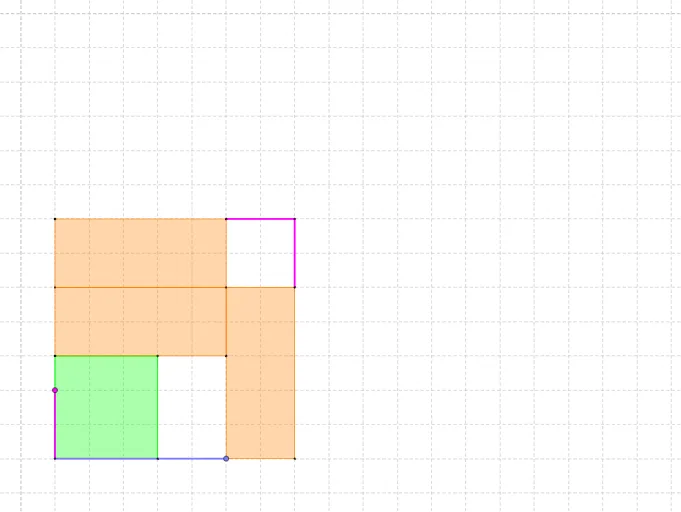
This example demonstrates Babylonian multiplication using a geometry-based visualization of repeated doubling and selective addition, turning the algorithmic idea into measurable geometric relationships (such as constructed lengths or additive regions). It centers on core concepts including the geometric interpretation of multiplication, iterative integer decompositions (a doubling-and-accumulation scheme akin to binary methods), and careful geometric construction to encode the computation. Construction uses GeoGebra commands reflected in the provided construct summary: Intersect to determine key intersection points; Point to define all intermediate and final vertices (e.g., A, B, C and derived points); Ray to set directions for steps; Circle to provide auxiliary constructions and scale correspondences; Mirror to exploit symmetry for aligned segments/regions; Polygon to form closed pieces whose accumulated contribution represents the product; Line and OrthogonalLine to build supporting straight lines and perpendiculars for proportional/projective relations; and Segment for explicit length tracks. The included geometric objects (poly1, poly2, poly3, and many labeled points such as A', p, q, etc.) indicate a stepwise assembly of additive components leading to the final multiplication result. Suitable for late secondary education through early undergraduate geometry/algebra instruction, as well as math-history and computational thinking demonstrations.
GeoGebra Commands & Parameters
Intersect(xAxis, yAxis) → APoint(yAxis) → BPoint(xAxis) → CRay(A, B) → aRay(A, C) → bPoint(a) → ECircle(A, E) → cIntersect(c, b, 1) → DMirror(A, D) → A'Ray(D, A') → dPoint(d) → FPolygon(A, G, 4) → poly1, e, f, g, h, I, JPolygon(A, H, 4) → poly2, i, j, k, l, K, LLine(J, I) → mOrthogonalLine(F, m) → nOrthogonalLine(M, n) → rIntersect(n, r) → NIntersect(m, n) → OIntersect(r, j) → PIntersect(n, k) → QPolygon(J, O, N, M) → poly3, j_1, o, n_1, m_1Polygon(M, N, Q, L) → poly4, m_2, n_2, q_1, l_1Polygon(N, F, H, P) → poly5, n_3, f_1, h_1, p_1Segment(A, E) → sSegment(A, F) → tSegment(Q, K) → a_1Segment(K, P) → b_1
AI Drawing Prompt Reference
Start at the origin, draw two rays along the x-axis and y-axis. Pick a point on the y-axis ray, draw a circle centered at the origin through that point, and find its intersection with the x-axis ray. Reflect the origin across this intersection to get a new point, then draw a ray from the intersection to the new point and pick a point on it. Construct two squares from the origin, then use lines and perpendiculars to create several intersection points and polygon regions. Finally, connect key points with segments to form a geometric visualization of multiplication.
The prompt above was compiled from the original drawing commands and is for reference only.