
Origami and Fractions
Loading the math board and drawing, please wait…
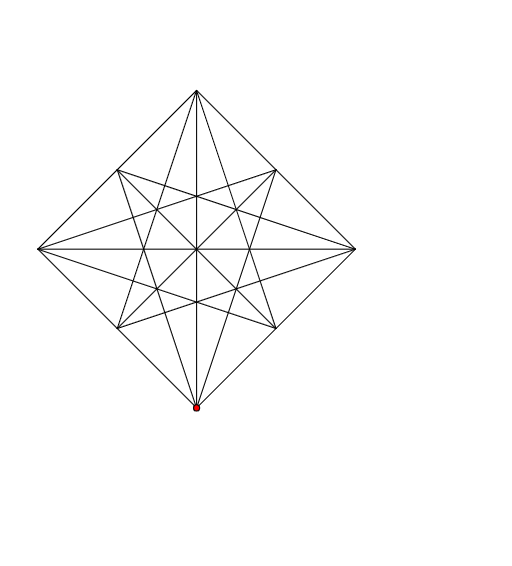
This example demonstrates the concept of fractions through paper folding. Using GeoGebra commands such as Intersect, Line, OrthogonalLine, Circle, Segment, and Midpoint, it provides a visual and interactive way to understand fractions. Suitable for students and teachers from elementary to high school.
GeoGebra Commands & Parameters
Intersect(xAxis, yAxis) → ALine(A, B) → aOrthogonalLine(B, a) → bCircle(B, A) → cIntersect(c, b, 2) → CCircle(C, B) → dCircle(A, B) → eIntersect(d, e, 2) → DSegment(D, C) → fSegment(C, B) → gSegment(A, B) → hSegment(A, D) → iMidpoint(A, D) → EMidpoint(D, C) → FMidpoint(C, B) → GMidpoint(B, A) → HSegment(A, C) → jSegment(D, B) → kSegment(F, H) → lSegment(E, G) → mSegment(H, C) → nSegment(C, E) → pSegment(D, H) → qSegment(D, G) → rSegment(A, F) → sSegment(A, G) → tSegment(E, B) → a_1Segment(B, F) → b_1
AI Drawing Prompt Reference
Draw a triangle and drop perpendiculars from its vertices to the opposite sides to get the feet of the altitudes. Circle the feet of the altitudes to intersect the perpendiculars at two points each. Connect these points to form multiple intersecting line segments and arcs, illustrating the concept of fractions. Start with the basic triangle, then add altitudes, circles, and intersecting segments, finally connecting the intersection points to create a complex geometric pattern.
The prompt above was compiled from the original drawing commands and is for reference only.