
GeoGebra Arc Length Exercise
Loading the math board and drawing, please wait…
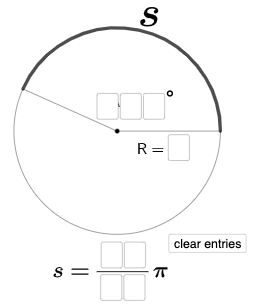
This example demonstrates the calculation and visualization of arc length in a circle. It involves core mathematical concepts such as circles, angles, and length calculations. Construction highlights include using GeoGebra commands like Intersect, Circle, Point, Segment, CircleArc, Textfield, Rotate, Angle, If, RotateText, Mode, and Length. It is suitable for high school students learning and understanding the formula for arc length and its practical applications.
GeoGebra Commands & Parameters
Intersect(xAxis, yAxis) → ACircle(A, B) → c_{1}Point(c_{1}) → CSegment(A, C) → iCircleArc(A, B, C) → eCircleArc(A, C, B) → kTextfield(a) → InputBox1Textfield(b) → InputBox2Textfield(c) → InputBox3Textfield(d) → InputBox4Textfield(f) → InputBox5Textfield(g) → InputBox6Textfield(h) → InputBox7Textfield(j) → InputBox8Segment(A, B) → lCircle(D, d) → pRotate(E, (((100 * a) + (10 * b) + c) * pi / 180), D) → E'CircleArc(D, E, E') → qCircleArc(D, E', E) → rSegment(D, E) → mAngle(E, D, E') → αSegment(D, E') → nRotate(E, ((10 * f) + g) / ((10 * h) + j), D) → E'_{1}If((((10 * f) + g) * pi / ((10 * h) + j)) ≟ (((100 * a) + (10 * b) + c) * (((2 * pi) * d)) / 360), "Arc length is correct!", (((10 * f) + g) * pi / ((10 * h) + j)) < (((100 * a) + (10 * b) + c) * (((2 * pi) * d)) / 360), "Arc length is too short!", (((10 * f) + g) * pi / ((10 * h) + j)) > (((100 * a) + (10 * b) + c) * (((2 * pi) * d)) / 360), "Arc length is too long!") → text4RotateText(text4, ((-pi)) / 6) → text5Mode(l1) → l2Length(l2) → oIf(o ≟ 0, "No digits repeat.", "You have a repeated digit.") → text6RotateText(text6, ((-pi)) / 6) → text7
AI Drawing Prompt Reference
Draw coordinate axes and their intersection point, then define a circle using the intersection and a second point so you have the radius. On this circle, construct two circle arcs that connect the same endpoints but with different intermediate points to show different arc routes. Add multiple input boxes for numerical parameters, then rotate one radius endpoint around the circle center according to an angle computed from those inputs, creating a new arc endpoint. Construct the arc determined by the center and the rotated endpoint, and also show the angle at the center between the two radii. Place explanatory text about whether the computed arc length is correct, too short, or too long, and rotate the text to match the diagram layout.
The prompt above was compiled from the original drawing commands and is for reference only.