
Generate two different uniform points on a sphere from one uniform draw: Icosido
Loading the math board and drawing, please wait…
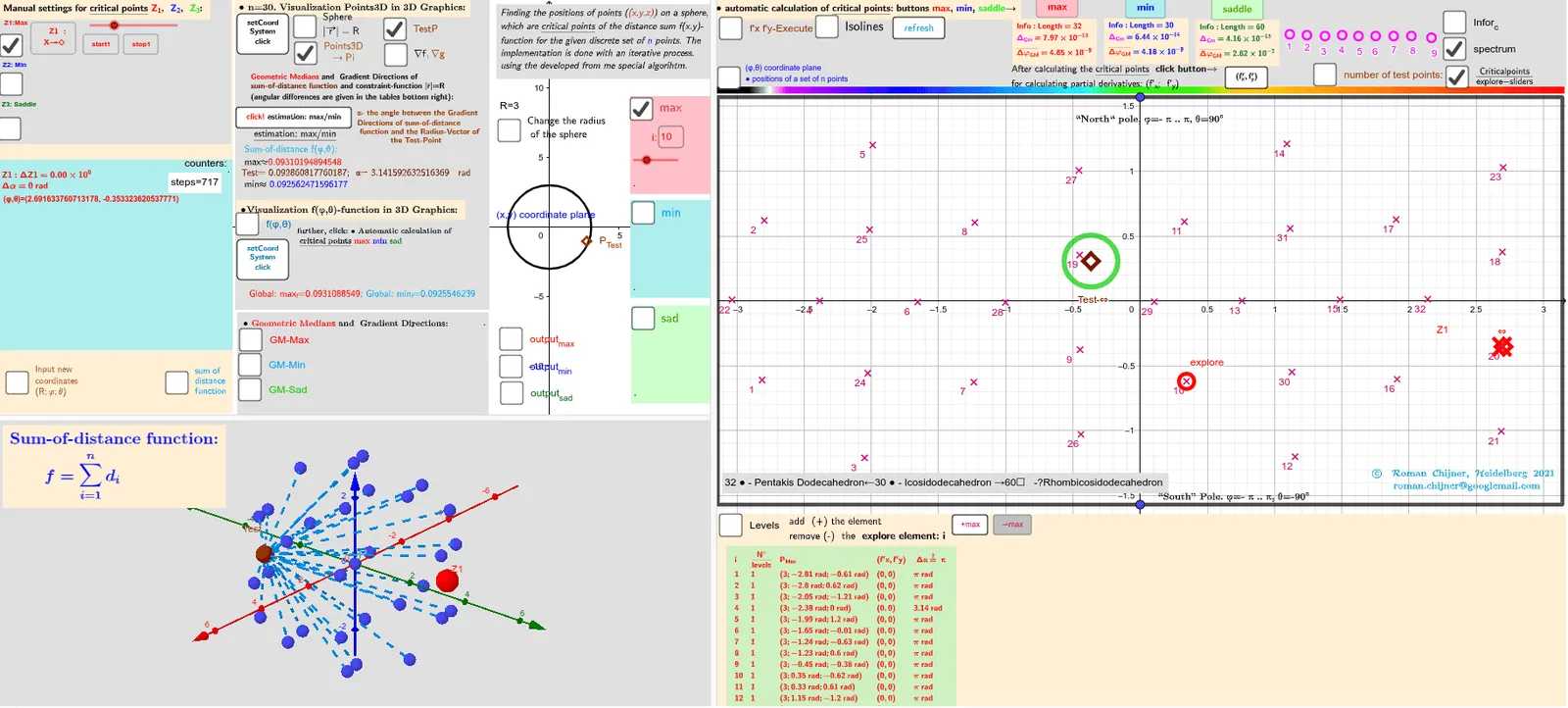
This GeoGebra example demonstrates how a single underlying uniform-draw mechanism can be used to produce two distinct points on a sphere whose placement follows a uniformity-oriented sampling idea. It visualizes the resulting geometric differences through computed metrics and shows behaviors related to extremal values (min/max) and dispersion-type measures. Key math concepts include spherical geometry, vector-based distance/angle measurement, and evaluating a target function (variance/dispersion-like criterion) via optimization logic. Construction-wise, it uses Sphere (the spherical surface) together with geometric entities such as Circle, Polygon, and PolyLine for references; PointIn to locate points on/within the spherical region; Vector, Angle, and Length to compute inter-point measures; and Function, If, Max, Min, and Sum to define and filter the objective values (e.g., quantities like Zmin/Zmax and corresponding 3D extrema such as fmin3D/fmax3D). It also relies on TableText/Textfield and labeled objects (e.g., parameters like alfa and tolerances) to report computed results, and can use CurveCartesian/transform-related text/annotation commands to present how the metric changes with parameters. Suitable for advanced secondary learners through introductory university students interested in probabilistic geometry, visualization, and optimization-style evaluation.
GeoGebra Commands & Parameters
Polygon({((-π), ((-π)) / 2), ((-π), π / 2), (π, π / 2), (π, ((-π)) / 2)}) → q_2PointIn(q_2) → Atest_2Function(f01, (-π), π, ((-π)) / 2, π / 2) → f0Zip((x(a), y(a), f0(a)), a, Zmin_2) → fmin3DZip((x(a), y(a), f0(a)), a, Zmax_2) → fmax3DVector((1.3 * Z3), (1.5 * Z3)) → AVZ3rVector((1.3 * Z3), (1.3 * Z3) + UnitVector[Sum[Zip[UnitVector[a - Z3], a, lP]]]) → AVZ3Vector((1.3 * Z2), (1.5 * Z2)) → AVZ2rVector((1.3 * Z2), (1.3 * Z2) + UnitVector[Sum[Zip[UnitVector[a - Z2], a, lP]]]) → AVZ2Vector((1.3 * Z1), (1.5 * Z1)) → AVZ1rVector((1.3 * Z1), (1.3 * Z1) + UnitVector[Sum[Zip[UnitVector[a - Z1], a, lP]]]) → AVZ1Vector((1.3 * Atest_R), (1.3 * Atest_R) + UnitVector[Sum[Zip[UnitVector[a - Atest_R], a, lP]]]) → AVtestVector((1.3 * Atest_R), (1.5 * Atest_R)) → AVtestrSphere(O, R) → spheraCircle(O, R, xOyPlane) → cPointIn(q_2) → RZ1_2PointIn(q_2) → RZ2_2Angle(AVtest, AVtestr) → αAAngle(AVZ1, AVZ1r) → αZ1Angle(AVZ2, AVZ2r) → αZ2Zip(Segment[Atest_R, p], p, lP) → segSum(seg) → sum_segPolyLine({((-π), ((-π)) / 2), ((-π), π / 2), (π, π / 2), (π, ((-π)) / 2), ((-π), ((-π)) / 2)}) → q1Flatten(Sequence[Sequence[((-π) + ((2 * π / na) * i), ((-π)) / 2 + (π / na * j)), j, 1, na], i, 1, na]) → ltest_2Zip((R; x(a); y(a)), a, ltest_2) → ltest_3Length(lZmax') → lälZmax'Textfield(n) → InputBox11alfa(R, lP, lZsad') → αsadIf(αZ1 > 100°, 180° - αZ1, αZ1) → αZ1'Textfield(m_1) → InputBox12Textfield(t) → InputBox13Textfield(m_2) → InputBox14PointIn(q_2) → RZ3_2Sum(Zip[1 / Length[p - Z3], p, lP]) → ZahZ3Angle(AVZ3, AVZ3r) → αZ3Textfield(R) → InputBox1Textfield(na) → InputBox2Max(f(Zmax_2)) → max_fMin(f(Zmin_2)) → min_fZip(Text["d_{" + (a) + "}", (Atest_R + Element[lP, a]) / 2], a, 1…n) → lPtxtZip(Segment[F_o, p], p, lP) → seg0Sum(seg0) → sum_seg0RotateText(txt, 90°) → txt1Sum(lZ3sad) → sumlZ3sadTextfield(Points3D) → InputBox7Textfield(lZsad') → InputBox17Textfield(lZmin') → InputBox16Textfield(lZmax') → InputBox15Textfield(jmin) → InputBox18Textfield(jmax) → InputBox19Textfield(jsad) → InputBox20Zip(Text["" + (b), a - (0.1, 0.1)], a, Zmax_2, b, 1…Length[Zmax_2]) → l2maxtxtZip(Text["" + (b), a - (0.1, 0.1)], a, Zmin_2, b, 1…Length[Zmin_2]) → l2mintxtZip(Text["" + (b), a - (0.1, 0.1)], a, Zsad_2, b, 1…Length[Zsad_2]) → l2sadtxtZip(Vector[r1, (1.153846154 * r1)], r1, (1.3 * Zip[(R * UnitVector[a]), a, lZmax'])) → lVmaxrZip(Vector[r1, (1.153846154 * r1)], r1, (1.3 * Zip[(R * UnitVector[a]), a, lZmin'])) → lVminrZip(Vector[r1, (1.153846154 * r1)], r1, (1.3 * Zip[(R * UnitVector[a]), a, lZsad'])) → lVsadralfa(R, lP, lZmax') → αmaxalfa(R, lP, lZmin') → αminarrow(R, lP, lZmax') → lVmaxarrow(R, lP, lZmin') → lVminarrow(R, lP, lZsad') → lVsadCurveCartesian((-π) + ((2 * π) * a), ((-π)) / 2, f0((-π) + ((2 * π) * a), ((-π)) / 2), a, 0, 1) → par1CurveCartesian((-π) + ((2 * π) * a), π / 2, f0((-π) + ((2 * π) * a), π / 2), a, 0, 1) → par2CurveCartesian((-π), ((-π)) / 2 + (π * a), f0((-π), ((-π)) / 2 + (π * a)), a, 0, 1) → par3CurveCartesian(π, ((-π)) / 2 + (π * a), f0(π, ((-π)) / 2 + (π * a)), a, 0, 1) → par4Polygon({((-π), ((-π)) / 2), ((-π), π / 2), (π, π / 2), (π, ((-π)) / 2)}) → q_3Textfield(achs) → InputBox3Zip(Atest_2 + (r_c; ((2 * π / n_c) * k)), k, 0…(n_c - 1)) → l0rSum(Unique[sgn(f(Atest_2) - f(l0r))]) → sum_rSum(Sequence[If[sum00_r(i) ≠ sum00_r(i + 1), 1, 0], i, 1, Length[sum00_r] - 1]) → sum01_rCircle(Atest_2, 0.2) → ciTableText(Append["i", Sequence[Length[lZsad']]], Append["\frac{N°}{levels} ", msad], Append["P_{sad }", lZsad'], Append["(f'x,f'y)", lZf'xysad], Append[" Δα≟ π ", αsad], "v") → text2cTableText(Append["i", Sequence[Length[αmax]]], Append["\frac{N°}{levels} ", mmax], Append["P_{Max }", lZmax'], Append["(f'x,f'y)", lZf'xymax], Append[" Δα≟ π ", αmax], "v") → text2aTableText(Append["i", Sequence[Length[αmin]]], Append["\frac{N°}{levels} ", mmin], Append["P_{Min }", lZmin'], Append["(f'x,f'y)", lZf'xymin], Append[" Δα≟ π ", αmin], "v") → text2bZip((x(a), y(a), f0(a)), a, Zsad_2) → fsad3D
AI Drawing Prompt Reference
Draw a 3D scene with a sphere centered at a point O and a spherical surface of radius R. Define a polygonal reference region on the sphere (a slice-like quadrilateral) to constrain sampling. From a single underlying uniform sampling idea, place two different points on the spherical region (a base point and a second point). Show the geometry by creating direction vectors from O toward each sampled point, and also toward the corresponding uniformly-generated reference directions for comparison. Compute the angles between each pair of vectors to obtain angle measures that reflect how the two points differ. Add a visible boundary polyline on the sphere (a closed reference path) and include text labels for the computed angle quantities, while allowing the user to vary R and the sampling resolution/number.
The prompt above was compiled from the original drawing commands and is for reference only.