
Fractions on the Number Line (Part 1)
Loading the math board and drawing, please wait…
In collections
Elementary School
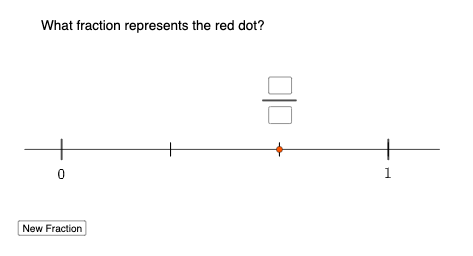
This example demonstrates how to represent and compare fractions on a number line. Core math concepts include fractions, rational numbers, and number line representation. It uses GeoGebra commands like Random, Sequence, RandomElement, Element, Point, Segment, and Textfield to generate random fraction points and draw the number line, making it suitable for middle school mathematics instruction to visually aid students in understanding the positional relationships of fractions on a number line.
GeoGebra Commands & Parameters
Random(2, 10) → aSequence(1, a) → l1RandomElement(l2) → bElement(l2, 1) → cPoint(xAxis) → BPoint(xAxis) → CSegment(B, C) → fSegment((0, 0.03), (0, -0.03)) → gTextfield(m) → InputBox1Textfield(n) → InputBox2Segment(P, D) → hSequence(Segment[(Element[l2, i], -0.02), (Element[l2, i], 0.02)], i, 0, a) → l3, {NaN, 0.04, 0.04, 0.04}Segment((1, 0.03), (1, -0.03)) → i
AI Drawing Prompt Reference
Draw a number line with several small vertical tick marks at key positions. Show two randomly selected fraction points on the number line, each with a short vertical marker and a visible fraction-style label above the markers. Connect the two fraction points with a segment to emphasize their relative positions. Include two text input boxes placed near the diagram for entering the numerator and denominator used to define the fraction values. The final figure should clearly illustrate and compare where fractions lie on the number line.
The prompt above was compiled from the original drawing commands and is for reference only.