
Fractions in a Circle
Loading the math board and drawing, please wait…
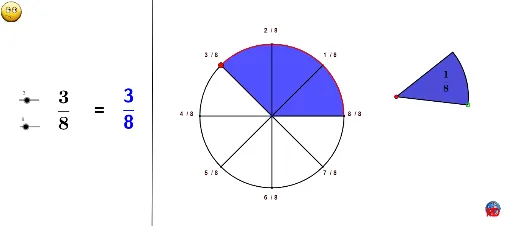
This example demonstrates how to visualize fractions within a circle by dividing and rotating sections. It involves core mathematical concepts like fractions, circles, geometric constructions, and rotational symmetry. Key GeoGebra commands and objects used include Circle, GCD, If, Polygon, Sequence, Rotate, Angle, Segment, Arc, Point, CircleSector, Line, CircleArc, Midpoint, and Center. Suitable for middle school and above students learning fractions, geometric transformations, and calculations.
GeoGebra Commands & Parameters
Circle(J, e) → tGCD(a, b) → cIf(num ≠ 1, num, 1) → numbIf(den ≠ 1, den, "") → denbDefined(denb) → aaPolygon(A, B, C, D) → poly1, a_1, b_1, c_1, dCircle(E, e) → fSequence(Rotate[F, i, E], i, 0, 6.28319, (2 * π / b)) → liste1Sequence(Segment[E, Element[liste1, i]], i, 1, Length[liste1]) → liste2Rotate(F, ((2 * a) * π / b), E) → MAngle(F, E, M) → αSegment(E, M) → gSegment(E, F) → hArc(f, F, M) → kSequence(Rotate[F + (1.5, 0), i, E], i, 0, 6.28319, (2 * π / denb)) → liste3Sequence(Segment[E, Element[liste3, i]], i, 1, Length[liste3]) → liste4Point(h) → GCircleSector(E, G, M) → pIf(numb > denb, floor(numb / denb), numb) → ttLine(H, I) → iSequence(Text["" + (k) + " / " + b, E - (0.52, 0) + (e + 0.75; ((2 * k) * π / b))], k, 1, b) → liste5Circle(E, e) → qPoint(t) → KSequence(Text["" + (k) + " / " + denb, E - (0.32, 0) + (e + 2.2; ((2 * k) * π / denb))], k, 1, denb) → liste6Rotate(K, (2 * π / b), J) → K'CircleSector(J, K, K') → rSegment(J, K) → jSegment(K', J) → lCircleArc(J, K, K') → sMidpoint(J, K) → LMidpoint(L, K) → NRotate(N, π / b, J) → L'Center(r) → O
AI Drawing Prompt Reference
Draw a large circle and a concentric smaller circle; divide the large circle into b equal sectors and the small circle into denb equal sectors. From each center draw radii to the division points, and highlight a sector representing a/b on the large circle and a sector representing num/denb on the small circle. Place fraction labels k/b around the large circle and k/denb around the small circle. Include an inscribed quadrilateral as a reference frame. Use sliders to change the numerators and denominators, dynamically updating the highlighted sectors and arcs to illustrate fractions through rotational symmetry.
The prompt above was compiled from the original drawing commands and is for reference only.