
Fraction Placement
Loading the math board and drawing, please wait…
In collections
The Fractions book
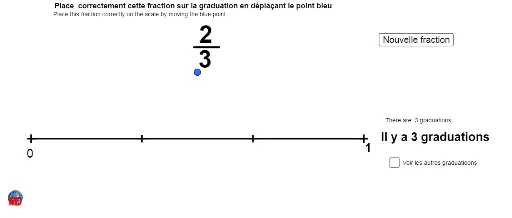
This example demonstrates placing fractions randomly in a coordinate system and visualizing their values. It involves core math concepts like arithmetic, fractions, set theory, expected value in calculus, orthocenter, and cubes. Construction uses commands like Random, Segment, Sequence, GCD, If, Distance, and objects such as Den, Num, A, B, a. Suitable for high school students and educators for teaching and exploring fraction-related concepts.
GeoGebra Commands & Parameters
Random(2, 15) → DenRandom(1, Den) → NumSegment(A, B) → aSequence((i / Den, 0), i, 1, Den - 1) → liste1GCD(Den, Num) → PGCDIf(Num ≠ Den, (Num / Den, 0), ((Num - 1) / Den, 0)) → DDistance(C, D) → aaSegment(E, F) → cSequence(Text[i / Den, Element[liste1, i] - (0.01, 0.05)], i, 1, Length[liste1]) → liste2
AI Drawing Prompt Reference
Place fractions randomly in a coordinate system and connect two points with a line segment, showing the values of the fractions. Generate two random numbers for the numerator and denominator, distribute points evenly along the x-axis based on the denominator, determine a special point based on the numerator, calculate the distance between two points, and label the fraction values at corresponding positions.
The prompt above was compiled from the original drawing commands and is for reference only.