
Fraction Addition Geometric Demo
Loading the math board and drawing, please wait…
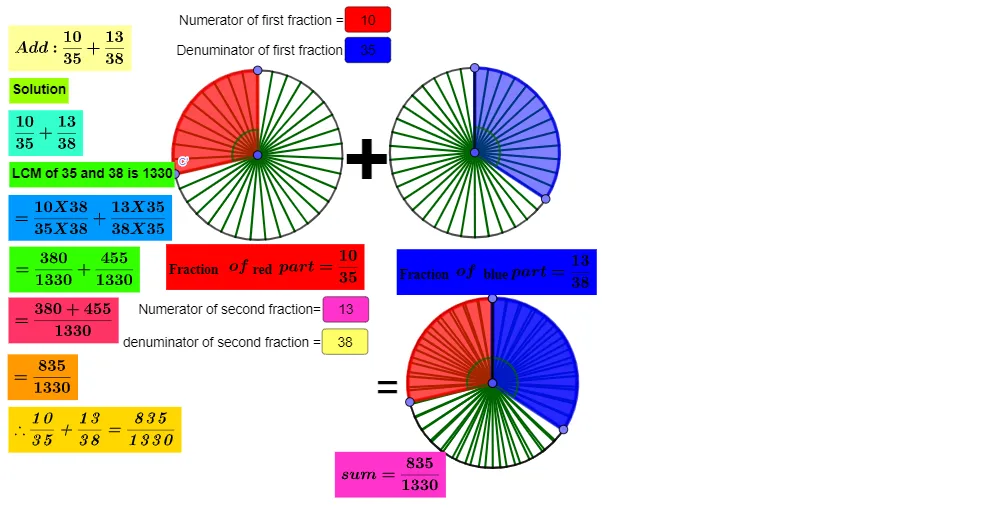
This GeoGebra example dynamically demonstrates fraction addition through geometric shapes such as circles and sectors, visually illustrating the process of finding a common denominator and adding fractions. Its core commands include Circle, Point, Segment, Sequence, Rotate, Angle, CircleSector, and LCM, combined with text and input fields for interactive parameter adjustment. The model bridges algebraic fraction operations with geometric representation, making it suitable for middle and high school mathematics education. Learners can explore how fraction sums change dynamically, reinforcing conceptual understanding of rational number arithmetic and spatial reasoning.
GeoGebra Commands & Parameters
Circle(A, 2) → cCircle(B, 2) → dPoint(c) → CSegment(A, C) → fPoint(d) → DSegment(B, D) → gSequence(Segment[A, Rotate[C, f°, A]], f, (360°) / b, 360, 360 / b) → l1Sequence(Segment[B, Rotate[D, f°, B]], f, (360°) / n, 360, 360 / n) → l2Circle(E, 2) → eRotate(C, (360° * a / b), A) → C'Angle(C, A, C') → αRotate(D, (-((360° * m / n))), B) → D'Angle(D', B, D) → βCircleSector(A, C, C') → hCircleSector(B, D', D) → kLCM(b, n) → iTextfield(a) → InputBox1Textfield(b) → InputBox2Textfield(m) → InputBox3Textfield(n) → InputBox4Point(e) → FSegment(E, F) → tSequence(Segment[E, Rotate[F, t°, E]], t, (360°) / b, 360, 360 / b) → l3Circle(G, 2) → c_1Point(c_1) → HSegment(G, H) → f_1Sequence(Segment[G, Rotate[H, f°, G]], f, (360°) / n, 360, 360 / n) → l4Rotate(F, (360° * a / b), E) → F'Angle(F, E, F') → γRotate(H, (-((360° * m / n))), G) → H'Angle(H', G, H) → δCircleSector(E, F, F') → d_1CircleSector(G, H', H) → e_1
AI Drawing Prompt Reference
Draw a diagram with several equal-radius circles, each with a chosen center and a point on the circumference. From each center, draw radius segments to those circumference points, then define adjustable rotation angles and rotate the radius segments about their centers to form two variable angles. Construct two corresponding circle-sector regions bounded by the original and rotated radii on the first pair of circles, and repeat the same idea on a second pair of equal circles using another adjustable rotation. Add angle labels for the formed angles and include adjustable parameters (four inputs) so the sector shapes and their relative positions update dynamically for the fraction-addition geometric demonstration.
The prompt above was compiled from the original drawing commands and is for reference only.