
Wave-like geometry from parametric curves and ellipses
Loading the math board and drawing, please wait…
In collections
geometriadinamica.es
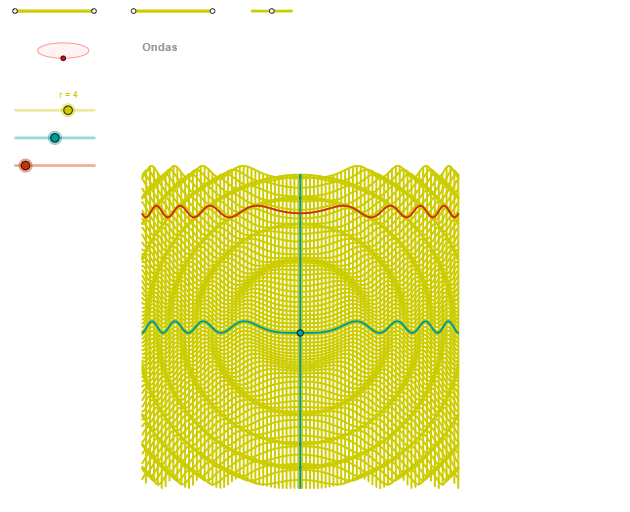
This example demonstrates a wave-like visual effect by combining parametric curves with ellipse geometry and angle-controlled construction. The key mathematical ideas include parametric equation/curve construction, ellipse properties, angle increments that introduce phase or periodic behavior, and the use of a step size to generate evolving geometric configurations via a sequence. In the GeoGebra build, commands such as Segment, Point, OrthogonalLine, Circle, Intersect, Ellipse, Angle, CurveCartesian, and Sequence are used to create foundational points and segments, construct perpendicular lines, define circle intersections, generate the ellipse, and compute/track angular relationships. Finally, CurveCartesian draws the resulting curves while Sequence (with a parameter step like “paso”) produces the successive objects that make the overall “wave” appearance. Suitable for middle school through early university users for geometry modeling, parametric curve visualization, and GeoGebra classroom demonstrations or self-study.
GeoGebra Commands & Parameters
Segment(Q5, Q6) → p5Point(p5) → P5Segment(Q3, Q4) → p2Point(p2) → P3Segment(P3, Q4) → p4Point(p4) → P4Segment(Q1, Q2) → p1Point(p1) → P1Segment(P1, Q2) → p3Point(p3) → P2OrthogonalLine(C, xAxis) → zz2Circle(C, 0.62) → zz0Intersect(zz0, zz2, 1) → ZZ4Intersect(zz0, zz2, 2) → ZZ3Ellipse(ZZ3, ZZ4, 0.65) → zElipse2Point(zElipse2) → ZIntersect(zElipse2, zz2) → ZZ7, ZZ8Angle(ZZ8, C, Z) → zAngIncOrthogonalLine(C, yAxis) → zz1Intersect(zz0, zz1, 2) → ZZ2Intersect(zz0, zz1, 1) → ZZ1Ellipse(ZZ1, ZZ2, 0.65) → zElipse1Point(zElipse1) → XYIntersect(zElipse1, zz1) → ZZ5, ZZ6Angle(ZZ6, C, XY) → zAngRotCurveCartesian(((r / 5 * u) * sin(zAngRot)), (r / 5 * ((((-u) * cos(zAngRot)) * sin(zAngInc)) + (cos(u^(2)) * cos(zAngInc)))), u, u1, u2) → curva1Segment(ZZ5, ZZ6) → zz4Segment(ZZ7, ZZ8) → zz3Intersect(zElipse2, zElipse1, 1) → zPunto1Intersect(zElipse2, zElipse1, 4) → zPunto2Segment(zPunto1, zPunto2) → zSeg2CurveCartesian((r / 5 * ((β * sin(zAngRot)) + (v * cos(zAngRot)))), (r / 5 * ((((-β) * cos(zAngRot)) * sin(zAngInc)) + ((v * sin(zAngRot)) * sin(zAngInc)) + (cos(β^(2) + v^(2)) * cos(zAngInc)))), v, v1, v2) → curva2CurveCartesian((r / 5 * ((u * sin(zAngRot)) + (α * cos(zAngRot)))), (r / 5 * ((((-u) * cos(zAngRot)) * sin(zAngInc)) + ((α * sin(zAngRot)) * sin(zAngInc)) + (cos(u^(2) + α^(2)) * cos(zAngInc)))), u, u1, u2) → a1Sequence(CurveCartesian[(r / 5 * ((u * sin(zAngRot)) + (v * cos(zAngRot)))), (r / 5 * ((((-u) * cos(zAngRot)) * sin(zAngInc)) + ((v * sin(zAngRot)) * sin(zAngInc)) + (cos(u^(2) + v^(2)) * cos(zAngInc)))), v, v1, v2], u, u1, u2, paso) → list2Sequence(CurveCartesian[(r / 5 * ((u * sin(zAngRot)) + (v * cos(zAngRot)))), (r / 5 * ((((-u) * cos(zAngRot)) * sin(zAngInc)) + ((v * sin(zAngRot)) * sin(zAngInc)) + (cos(u^(2) + v^(2)) * cos(zAngInc)))), u, u1, u2], v, v1, v2, paso) → list1
AI Drawing Prompt Reference
Create a wave-like geometric composition featuring two intersecting ellipses as the fundamental framework. These ellipses are constructed from circle intersections with orthogonal lines to the coordinate axes, possessing specific eccentricities. Around both ellipses, multiple sets of parametric curves are generated using angle parameters as controls. These curves distribute along the elliptical trajectories, creating layered wave-like visual effects. The curves employ sine and cosine functions combined with angle increments to produce periodic oscillating transformations. A sequence of continuously varying curves is generated through step-size control, overall presenting a dynamic geometric form resembling flowing waves.
The prompt above was compiled from the original drawing commands and is for reference only.