
Regladas (Ruled/Developable) Surface Construction
Loading the math board and drawing, please wait…
In collections
geometriadinamica.es
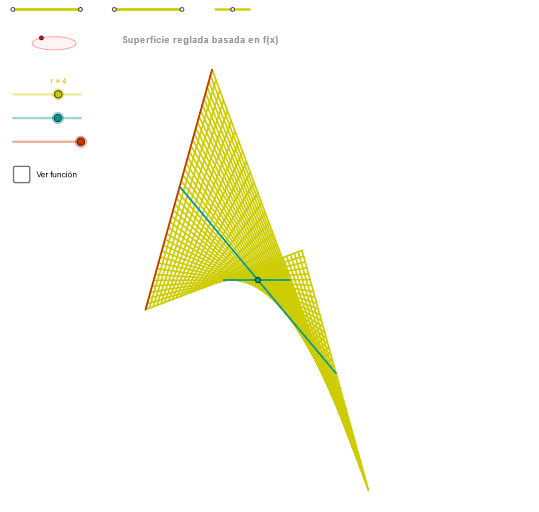
This GeoGebra example demonstrates how to construct and visualize a Regladas (ruled/developable) surface by building the geometry from interactive control elements and then sweeping the required constraints to form the surface. It centers on core geometry ideas such as constructing auxiliary primitives (segments, points, circles/ellipses), using intersection and orthogonality constraints to determine key parameters, and then using sequence-driven or parametrized curve elements to generate the evolving surface shape. Construction-wise, it leverages commands including Segment and Point for the scaffolding, OrthogonalLine for perpendicular constraints, Circle together with Intersect to locate critical points, Ellipse to provide a reference boundary/trajectory, Angle to encode or display angular relationships, CurveCartesian to define Cartesian curve pieces, and Sequence (with a step variable like “paso”) to progress through intermediate objects that collectively form the surface. The build also uses many derived intermediate objects (e.g., the p/q/Q and ZZ/zElipse-style constructs) to control the final ruled surface geometry. Suitable for high school advanced geometry through early university levels, especially for lessons on geometric constructions, coordinate/analytic geometry, and visualization-driven learning of surface generation.
GeoGebra Commands & Parameters
Segment(Q5, Q6) → p5Point(p5) → P5Segment(Q3, Q4) → p2Point(p2) → P3Segment(P3, Q4) → p4Point(p4) → P4Segment(Q1, Q2) → p1Point(p1) → P1Segment(P1, Q2) → p3Point(p3) → P2OrthogonalLine(C, xAxis) → zz2Circle(C, 0.62) → zz0Intersect(zz0, zz2, 1) → ZZ4Intersect(zz0, zz2, 2) → ZZ3Ellipse(ZZ3, ZZ4, 0.65) → zElipse2Point(zElipse2) → ZIntersect(zElipse2, zz2) → ZZ7, ZZ8Angle(ZZ8, C, Z) → zAngIncOrthogonalLine(C, yAxis) → zz1Intersect(zz0, zz1, 2) → ZZ2Intersect(zz0, zz1, 1) → ZZ1Ellipse(ZZ1, ZZ2, 0.65) → zElipse1Point(zElipse1) → XYIntersect(zElipse1, zz1) → ZZ5, ZZ6Angle(ZZ6, C, XY) → zAngRotCurveCartesian(((r / 5 * v) * sin(zAngRot)), (r / 5 * (((((-v) * f(0)) * cos(zAngRot)) * sin(zAngInc)) + (f(0) * cos(zAngInc)))), v, v1, v2) → curva1Segment(ZZ5, ZZ6) → zz4Segment(ZZ7, ZZ8) → zz3Intersect(zElipse2, zElipse1, 1) → zPunto1Intersect(zElipse2, zElipse1, 4) → zPunto2Segment(zPunto1, zPunto2) → zSeg2CurveCartesian((r / 5 * ((β * sin(zAngRot)) + (u * cos(zAngRot)))), (r / 5 * (((((-β) * f(u)) * cos(zAngRot)) * sin(zAngInc)) + ((u * sin(zAngRot)) * sin(zAngInc)) + (f(u) * cos(zAngInc)))), u, u1, u2) → curva2Sequence(CurveCartesian[(r / 5 * ((v * sin(zAngRot)) + (u * cos(zAngRot)))), (r / 5 * (((((-v) * f(u)) * cos(zAngRot)) * sin(zAngInc)) + ((u * sin(zAngRot)) * sin(zAngInc)) + (f(u) * cos(zAngInc)))), v, v1, v2], u, u1, u2, paso) → list2CurveCartesian((r / 5 * ((v * sin(zAngRot)) + (α * cos(zAngRot)))), (r / 5 * (((((-v) * f(α)) * cos(zAngRot)) * sin(zAngInc)) + ((α * sin(zAngRot)) * sin(zAngInc)) + (f(α) * cos(zAngInc)))), v, v1, v2) → a1Sequence(CurveCartesian[(r / 5 * ((v * sin(zAngRot)) + (u * cos(zAngRot)))), (r / 5 * (((((-v) * f(u)) * cos(zAngRot)) * sin(zAngInc)) + ((u * sin(zAngRot)) * sin(zAngInc)) + (f(u) * cos(zAngInc)))), u, u1, u2], v, v1, v2, paso) → list1
AI Drawing Prompt Reference
Draw a developable surface by constructing auxiliary segments, points, and circles, using intersection and orthogonality to determine key parameters, and then generating the surface shape with parametrized curve elements. Start by creating basic geometric elements, then draw circles and ellipses as reference boundaries, determine critical points with orthogonal lines, and finally use parametrized curves and sequences to generate the surface.
The prompt above was compiled from the original drawing commands and is for reference only.