
Fraction Addition Demonstration by R SANKARA NARAYANA REDDY
Loading the math board and drawing, please wait…
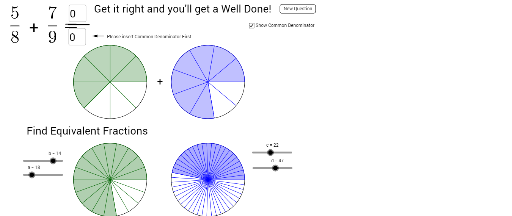
This example demonstrates the geometric representation of fraction addition, visually showing the process of adding fractions. Core math concepts include fraction operations, geometric graph representation, and logical judgment. Construction highlights involve commands like Random, Circle, Sequence, Sector, Textfield, Segment, If, Vector, and objects such as D1, N1, C1, list1, button1, etc., enabling dynamic interaction and conditional logic. Suitable for middle school and above mathematics education for understanding and applying fraction addition.
GeoGebra Commands & Parameters
Random(2, 10) → D1Random(2, 10) → D2Random(1, D1 - 1) → N1Random(1, D2 - 1) → N2Circle((5, 5), 1.5) → C1Sequence(Rotate[B, (360° * i / D1), (5, 5)], i, 1, D1) → list1Sequence(Segment[A, Element[list1, i]], i, 1, D1) → list2Sector(C1, B, Element[list1, N1]) → c_1Circle((9, 5), 1.5) → C2Sequence(Rotate[D, (360° * i / D2), (9, 5)], i, 1, D2) → list3Sequence(Segment[C, Element[list3, i]], i, 1, D2) → list4Sector(C2, C, Element[list3, N2]) → d_1Circle((5, 1), 1.5) → C3Circle((9, 1), 1.5) → C4Sequence(Rotate[F, (360° * i / a), E], i, 1, a) → list5Sequence(Segment[E, Element[list5, i]], i, 1, a) → list6Sector(C3, E, Element[list5, b]) → eCircle((5, 1), 1.5) → C5Sequence((LCM[D1, D2] * i), i, 1, 5) → PossibleSequence(Rotate[H, (360° * i / d), G], i, 1, d) → list7Sequence(Segment[G, Element[list7, i]], i, 1, d) → list8Sector(C4, G, Element[list7, c]) → gCircle(G, 1.5) → C6Textfield(ans5) → inputBox5Segment(M, N) → jIf(ans6 ∈ Possible, true, false) → STextfield(ans1) → inputBox1Vector(O, P) → u