
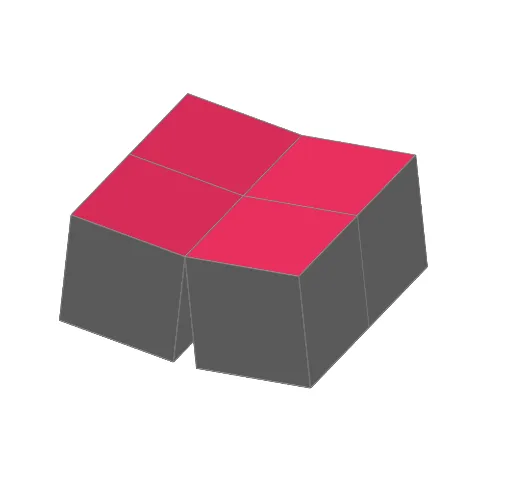
Four Cube Flexagon Animation
Loading the math board and drawing, please wait…
In collections
Action Modular Origami
This example demonstrates an animated model of a Four Cube Flexagon, a paper-folding creation from the book 'Action Modular Origami'. It visually shows how a cube-like structure can flex and transform in 3D space. The core mathematical concepts include solid geometry, vector operations, spatial relationships between planes and lines, and geometric transformations such as rotation, translation, and reflection. The construction uses GeoGebra commands: Cube to create the base cube, Point, Midpoint, and Intersect to define key vertices, OrthogonalLine and Plane to construct auxiliary lines and faces, and Rotate, Translate, Vector, and Mirror to animate the flexing motion. Objects include multiple faces (faceABCD, faceADHE, etc.) and edges (edgeAD, edgeAB, etc.), with parameters α, β, and d controlling the animation. Suitable for high school to early college students, this example helps understand spatial transformations and the mathematics of origami, and can serve as a resource for mathematical modeling or STEAM education.
GeoGebra Commands & Parameters
If(ff < 0.5, (-((smoothramp((2 * ff)) * 180°))), 0°) → αPoint(xAxis) → BIntersect(zAxis, xAxis) → APoint(Circle[B, Distance[A, B], Segment[A, B]]) → CCube(A, B, C) → a, D, faceCDHG, faceEFGH, edgeAD, edgeAB, edgeBC, edgeCD, edgeAE, edgeDH, edgeEH, edgeEF, E, edgeBF, edgeFG, edgeCG, edgeGH, F, G, H, faceABCD, faceADHE, faceABFE, faceBCGFMidpoint(D, E) → KOrthogonalLine(K, faceADHE) → iMidpoint(A, F) → JOrthogonalLine(J, faceABFE) → hIf(ff ≥ 0.5 ∧ ff < 0.75, (-(((smoothramp((4 * (ff - 0.5))) * 90) + 180)°)), If[ff ≥ 0.75, (-(((smoothramp((4 * (ff - 0.75))) * 90) + 90 + 180)°)), 0°]) → βRotate(Rotate[H, β, i], (-α), h) → H'Rotate(Rotate[F, β, i], (-α), h) → F'If(ff ≤ 0.5, Plane[A, faceABFE], If[ff > 0.5 ∧ ff < 0.75, Plane[H', faceABFE], Plane[F', faceABFE]]) → dTranslate({faceABFE, faceADHE, faceBCGF, faceCDHG}, Vector[(0, 0, 0)]) → cube0Rotate(Rotate[cube0, β, i], (-α), h) → cube0'Midpoint(A, C) → IOrthogonalLine(I, faceABCD) → gOrthogonalLine(I, xOyPlane) → fRotate(Rotate[B, β, i], (-α), h) → B'Vector(B, B') → uPlane(D, F, H) → bMirror(cube0', d) → cube0''Rotate(Rotate[faceABCD, β, i], (-α), h) → poly1Rotate(Rotate[A, β, i], (-α), h) → A'If(ff < 0.25, Plane[A', faceADHE], If[ff ≥ 0.25 ∧ ff < 0.5, Plane[B', faceADHE], Plane[A, faceADHE]]) → cMirror(cube0'', c) → cube0'''Mirror(cube0', c) → cube0'_1Rotate(faceCDHG, β, i) → faceCDHG'Rotate(A, β, i) → A''Rotate(D, β, i) → D'Rotate(C, β, i) → C'Rotate(Rotate[faceEFGH, β, i], (-α), h) → poly3Mirror(poly1, d) → poly1'Mirror(poly3, d) → poly3'Mirror(poly1, c) → poly1'_1Mirror(poly3, d) → poly3'_1Mirror(poly3, c) → poly3'_2Mirror(poly3'_1, c) → poly2Mirror(poly1', c) → poly1''
AI Drawing Prompt Reference
Create a four cube flexagon animation, including multiple faces (e.g., ABCD, ADHE) and edges (e.g., AD, AB), controlled by parameters α and β for rotation angles. Show how a cube-like structure folds and transforms in 3D space. Start by creating the cube, then define key points and auxiliary lines, and use rotation, translation, and mirroring operations to achieve the animation effect.
The prompt above was compiled from the original drawing commands and is for reference only.