
Folding and Unfolding a Net
Loading the math board and drawing, please wait…
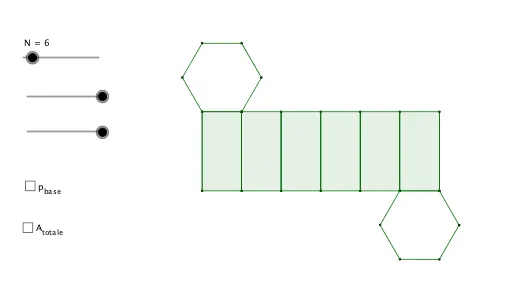
This example demonstrates the process of constructing 3D shapes by folding and unfolding 2D nets. It involves core mathematical concepts such as solid geometry, polygons, transformations, and vectors. The construction utilizes GeoGebra commands like Sequence, Insert, Div, Segment, and objects like t, N, l, a, z, R_z, LiRa, LiR, V_0, RV_0, RV_x, RV_y, SumRV, s, R_x, α, f, Cav, altezza, S_R, VQ, VQ_x, VQ_y, SumVQ, R, V_{0y}, V_{0x}, SumV_0, P, Q, M, R1, b, Rb, RP, p, PQ, PP, lista1, S. It is suitable for high school students learning about the construction of 3D shapes and for mathematical teaching demonstrations.
GeoGebra Commands & Parameters
Sequence({{cos(((k * a) * t)), (-sin(((k * a) * t))), 0}, {sin(((k * a) * t)), cos(((k * a) * t)), 0}, {0, 0, 1}}, k, 0, N) → LiRaSequence({{cos((k * a)), sin((k * a)), 0}, {(-sin((k * a))), cos((k * a)), 0}, {0, 0, 1}}, k, 0, N) → LiRSequence(Element[({{l, 0, 0}} * Element[LiR, k]), 1], k, 1, N + 1) → V_0Sequence(Element[Element[RV_0, k], 1], k, 1, N + 1) → RV_xSequence(Element[Element[RV_0, k], 2], k, 1, N + 1) → RV_ySequence({Sum[RV_x, k], Sum[RV_y, k], 0}, k, 1, N + 1) → SumRVSequence(Element[({Element[V_0, k]} * Element[LiRa, k]), 1], k, 1, N) → VQSequence(Element[Element[VQ, k], 1], k, 1, N) → VQ_xSequence(Element[Element[VQ, k], 2], k, 1, N) → VQ_ySequence({Sum[VQ_x, k], Sum[VQ_y, k], 0}, k, 1, N) → SumVQSequence(Element[SumVQ, k] + {0, 0, (-1 * altezza)}, k, 1, N) → RSequence(Element[Element[V_0, k], 2], k, 1, N + 1) → V_{0y}Sequence(Element[Element[V_0, k], 1], k, 1, N + 1) → V_{0x}Sequence({Sum[V_{0x}, k], Sum[V_{0y}, k], 0}, k, 1, N + 1) → SumV_0Sequence(Element[SumV_0, k], k, 1, N + 1) → PInsert({Element[P, N]}, SumVQ, 1) → QDiv(N, 2) → MInsert({Element[P, N] + {0, 0, (-1 * altezza)}}, R, 1) → R1Sequence((Element[Element[(Q * Cav), k], 1], Element[Element[(Q * Cav), k], 2]), k, 1, N + 1) → PQSequence((Element[Element[(RP * Cav), k], 1], Element[Element[(RP * Cav), k], 2]), k, 1, N + 1) → PPSequence(Element[R, N] + Element[S_R, k], k, 1, N + 1) → SSequence((Element[Element[(R1 * Cav), k], 1], Element[Element[(R1 * Cav), k], 2]), k, 1, N + 1) → PRSequence((Element[Element[(S * Cav), k], 1], Element[Element[(S * Cav), k], 2]), k, 1, N + 1) → PSSequence(Segment[Element[PS, k], Element[PS, k + 1]], k, 1, N) → SpigoliSottoSequence(Segment[Element[PP, k], Element[PP, k + 1]], k, 1, N) → SpigoliSopraSequence(Polygon[Element[PQ, k], Element[PQ, k + 1], Element[PR, k + 1], Element[PR, k]], k, 1, N) → FacceLatSequence(Segment[Element[PQ, k], Element[PR, k]], k, 1, N + 1) → SpigoliLatSequence(Segment[Element[PS, k], Element[PS, k + 1]], k, 1, N) → p_{base}Sequence(Segment[Element[PR, k], Element[PR, k + 1]], k, 1, N + 1) → SpigoliLatSottoSegment(Element[PQ, 1], Element[PR, 1]) → h
AI Drawing Prompt Reference
Draw a 3D shape formed by folding a 2D net. First, create an N-vertex square net, then rotate this net around its center to generate a series of vertices and edges. Next, connect these vertices and edges in a specific order to form the side and bottom faces of the 3D shape. Finally, combine the side and bottom faces to create the complete 3D shape.
The prompt above was compiled from the original drawing commands and is for reference only.