
Folding and Symmetry Lines in a Square
Loading the math board and drawing, please wait…
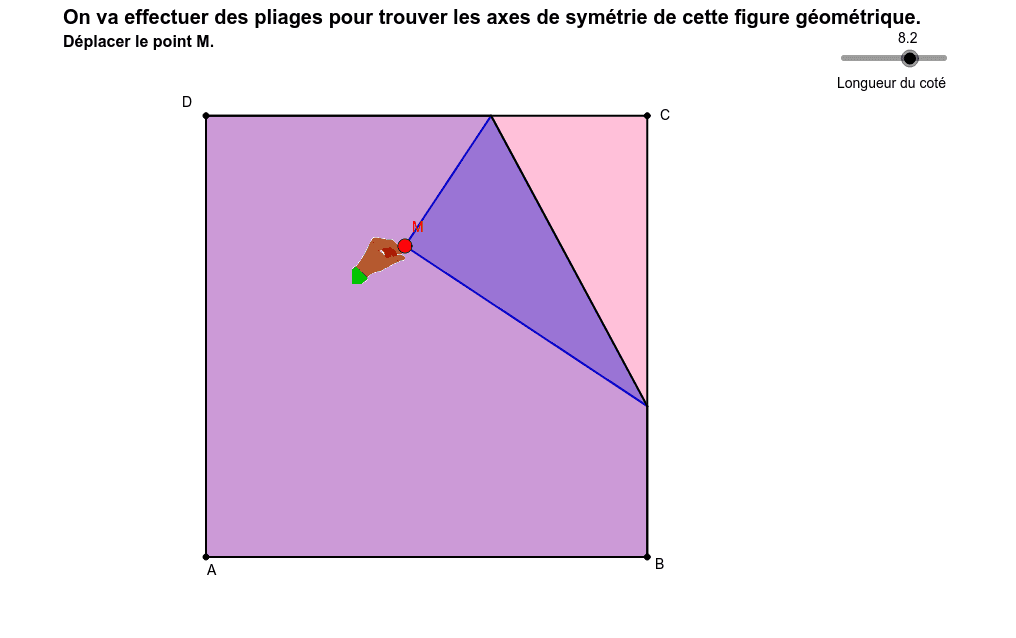
This example demonstrates the symmetry lines generated by folding a square and their properties. Core mathematical concepts include symmetry, midpoint of segments, angle bisectors, and reflection transformations. Construction highlights involve commands like Polygon, Line, LineBisector, Intersect, Mirror, Midpoint, Segment, and If in GeoGebra. Suitable for high school geometry education to understand symmetry and transformations.
GeoGebra Commands & Parameters
Polygon(A, B, C, D) → poly1, a_1, b_1, d_1, c_1Line(C, B) → jLine(D, C) → kLine(A, B) → lLine(D, A) → mLineBisector(M, C) → cIntersect(c, k) → F_1Intersect(c, l) → GIntersect(c, m) → HIntersect(j, c) → IMirror(B, c) → B'Mirror(D, c) → D'Mirror(A, c) → A'Polygon(M, F_1, I) → poly2, i, e, fPolygon(F_1, D, A, B, I) → poly3, f_1, d, a_2, b_2, i_1Polygon(F_1, M, B', G) → poly4, f_2, e_1, b', gPolygon(F_1, D, A, G) → poly5, f_3, d_2, a_3, g_1Polygon(F_1, M, B', A', H) → poly6, f_4, e_2, b'_1, a', hPolygon(F_1, D, H) → poly7, h_1, f_5, d_3Polygon(H, D', M, I) → poly8, h_2, d', e_3, i_2Polygon(H, A, B, I) → poly9, h_3, a_4, b_3, i_3Polygon(H, D', M, B', G) → poly10, h_4, d'_1, e_4, b'_2, g_2Polygon(H, A, G) → poly11, g_3, h_5, a_5Polygon(G, B, I) → poly13, i_4, g_4, b_4Polygon(G, A', D', M, I) → poly12, n, p, q, r, sMidpoint(D, C) → EMidpoint(A, B) → FSegment(E, F) → tIf(Distance[M, D] ≤ 0.05, 1.0, 0.0) → okMidpoint(C, M) → JMidpoint(b_1) → KMidpoint(c_1) → LLine(L, K) → a1Line(E, F) → b1Line(D, B) → bLine(D, B) → c1Line(C, A) → d1
AI Drawing Prompt Reference
Draw a square and its two diagonals. Inside the square, construct a line segment from the midpoint of one side to the opposite vertex, serving as a fold line. Using this line as a symmetry axis, fold the square to create multiple triangular and polygonal regions. Mark the intersections of the fold line with the square's sides and diagonals, and reflect the square's vertices across the fold line. Connect these points to partition the square into smaller triangles and quadrilaterals, and mark the midpoints of all sides. Finally, draw dashed lines connecting the midpoints of opposite sides and extending the diagonals to show all symmetry lines.
The prompt above was compiled from the original drawing commands and is for reference only.