
Trigonometry as Ratios
Loading the math board and drawing, please wait…
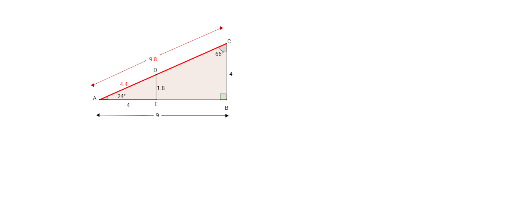
This example dynamically demonstrates the ratio of side lengths to angles in a triangle, visually illustrating the definition of trigonometric functions. Core math concepts include trigonometry, side length ratios, angle measurement, and geometric construction. It uses commands like Polygon, Angle, Point, OrthogonalLine, Intersect, and Segment in GeoGebra. Suitable for high school mathematics teaching to help students understand the geometric meaning and practical application of trigonometric functions.
GeoGebra Commands & Parameters
Polygon(A, B, C) → poly1, c, a, bAngle(C, B, A) → αAngle(B, A, C) → βAngle(A, C, B) → γPoint(b) → DOrthogonalLine(D, c) → fIntersect(f, c) → ESegment(D, E) → gSegment(A, E) → hSegment(A, D) → iSegment(F, G) → jSegment(H, I) → kSegment(J, K) → lSegment(L, M) → m
AI Drawing Prompt Reference
Draw an arbitrary triangle and label its three interior angles. Pick a point on one side of the triangle, then construct a perpendicular from that point to the opposite side, marking the foot of the perpendicular on that side. Connect the point to the foot to form a vertical segment, and also connect the point and the foot to one vertex of the triangle, creating two right triangles. Finally, draw three separate segments of different lengths in the blank area to represent side-length ratios corresponding to the angles, illustrating the trigonometric ratio concept.
The prompt above was compiled from the original drawing commands and is for reference only.