
Flower Pattern Created by Rotating Polygons
Loading the math board and drawing, please wait…
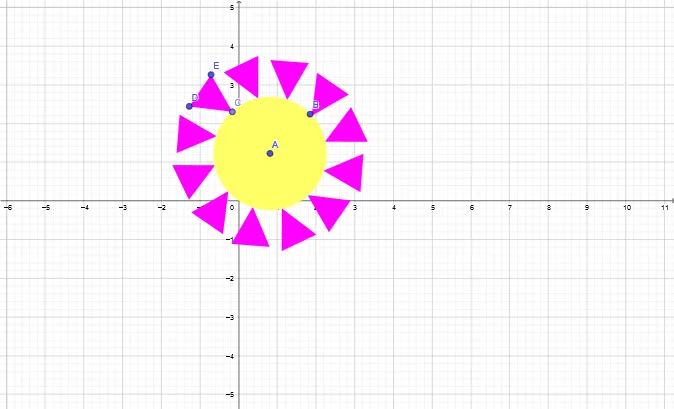
This example demonstrates how to create a symmetric flower-like geometric pattern by rotating a polygon multiple times around a central point. It illustrates the use of rotation transformations to replicate a basic polygon and arrange copies into a visually appealing composite shape. Core mathematical concepts include rotational symmetry, polygon properties, and composition of transformations. The construction uses GeoGebra commands such as Circle, Point, Polygon, and Rotate. Key objects include the initial polygon, its vertices, edges, and interior regions, which are rotated at specific angles (e.g., 120° and 240°) to generate multiple symmetric copies. This example is suitable for middle or high school geometry lessons on transformations, symmetry, and polygon combinations, as well as for mathematical art projects or introductory computer-aided design. By adjusting the rotation angle and polygon shape, students can explore flowers with different symmetry orders.
GeoGebra Commands & Parameters
Circle(A, B) → cPoint(c) → CPolygon(C, D, E) → t1, e, c_1, dPoint(c) → FRotate(C, 30°, A) → C'Rotate(D, 30°, A) → D'Rotate(E, 30°, A) → E'Polygon(C', D', E') → t1', e', c', d'Rotate(C', 30°, A) → C''Rotate(D', 30°, A) → D''Rotate(E', 30°, A) → E''Polygon(C'', D'', E'') → t1'', e'', c'', d''Rotate(C'', 30°, A) → C'''Rotate(D'', 30°, A) → D'''Rotate(E'', 30°, A) → E'''Polygon(C''', D''', E''') → t1''', e''', c''', d'''Rotate(C''', 30°, A) → MRotate(D''', 30°, A) → NRotate(E''', 30°, A) → OPolygon(M, N, O) → t2, o, m, nRotate(M, 30°, A) → M'Rotate(N, 30°, A) → N'Rotate(O, 30°, A) → O'Polygon(M', N', O') → t2', o', m', n'Rotate(M', 30°, A) → M''Rotate(N', 30°, A) → N''Rotate(O', 30°, A) → O''Polygon(M'', N'', O'') → t2'', o'', m'', n''Rotate(M'', 30°, A) → M'''Rotate(N'', 30°, A) → N'''Rotate(O'', 30°, A) → O'''Polygon(M''', N''', O''') → t2''', o''', m''', n'''Rotate(M''', 30°, A) → PRotate(N''', 30°, A) → QRotate(O''', 30°, A) → RPolygon(P, Q, R) → t3, r, p, qRotate(P, 30°, A) → P'Rotate(Q, 30°, A) → Q'Rotate(R, 30°, A) → R'Polygon(P', Q', R') → t3', r', p', q'Rotate(P', 30°, A) → P''Rotate(Q', 30°, A) → Q''Rotate(R', 30°, A) → R''Polygon(P'', Q'', R'') → t3'', r'', p'', q''Rotate(P'', 30°, A) → P'''Rotate(Q'', 30°, A) → Q'''Rotate(R'', 30°, A) → R'''Polygon(P''', Q''', R''') → t3''', r''', p''', q'''
AI Drawing Prompt Reference
Create a symmetric flower pattern composed of multiple rotated polygons. Start by drawing a circle and selecting a point on it as the vertex of a triangle. Then, draw the triangle. Rotate this triangle 30 degrees around the circle's center to generate multiple identical triangles, forming a symmetrical flower pattern.
The prompt above was compiled from the original drawing commands and is for reference only.