
Rotated chord flower: polygon and arc intersections
Loading the math board and drawing, please wait…
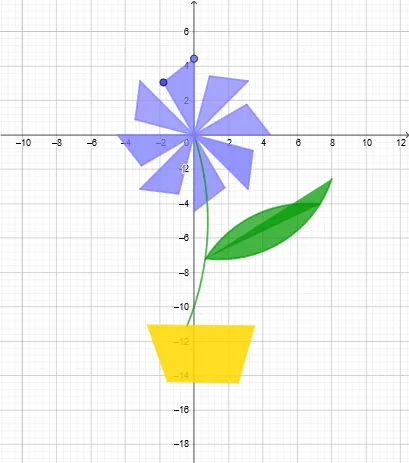
This example demonstrates how to build a symmetric “flower” pattern by rotating polygonal configurations and combining them via arc segments and intersection points. The key mathematical ideas include geometric construction of polygons, rotational transformations (which preserve distances and angles), and precise placement using circle arcs (CircumcircleArc, CircleArc) and computed intersections (Intersect). Construction-wise, the model uses GeoGebra commands Point and Polygon to set initial points and polygonal faces; Rotate to generate rotated copies of key vertices and sub-structures; Intersect to locate new points from crossings of rotated edges/arc pieces; and CircumcircleArc and CircleArc to extract the arc segments that form the petal-like boundaries. Suitable for upper-secondary to introductory university geometry, interactive construction lessons, and problem-solving practice involving transformation-based design.
GeoGebra Commands & Parameters
Point(yAxis) → APoint(yAxis) → BPolygon(A, B, C) → t1, c, a, bRotate(A, 45°, A) → A'Rotate(B, 45°, A) → B'Rotate(C, 45°, A) → C'Polygon(A', B', C') → t1', c', a', b'Rotate(A', 45°, A) → A''Rotate(B', 45°, A) → B''Rotate(C', 45°, A) → C''Polygon(A'', B'', C'') → t1'', c'', a'', b''Rotate(A'', 45°, A) → A'''Rotate(B'', 45°, A) → B'''Rotate(C'', 45°, A) → C'''Polygon(A''', B''', C''') → t1''', c''', a''', b'''Rotate(A''', 45°, A) → DRotate(B''', 45°, A) → ERotate(C''', 45°, A) → FPolygon(D, E, F) → t2, f, d, eRotate(D, 45°, A) → D'Rotate(E, 45°, A) → E'Rotate(F, 45°, A) → F'Polygon(D', E', F') → t2', f', d', e'Rotate(D', 45°, A) → D''Rotate(E', 45°, A) → E''Rotate(F', 45°, A) → F''Polygon(D'', E'', F'') → t2'', f'', d'', e''Rotate(D'', 45°, A) → D'''Rotate(E'', 45°, A) → E'''Rotate(F'', 45°, A) → F'''Polygon(D''', E''', F''') → t2''', f''', d''', e'''Intersect(c, b) → JPoint(yAxis) → KCircumcircleArc(J, K, L) → gPolygon(M, N, O, P) → q1, m, n, o, pPoint(g) → QCircleArc(Q, R, S) → hCircumcircleArc(T, U, V) → kCircumcircleArc(T, U, W) → qCircumcircleArc(T, Z, A_1) → rCircumcircleArc(T, Z, B_1) → sCircumcircleArc(T, C_1, D_1) → tCircumcircleArc(T, A_1, E_1) → c_1
AI Drawing Prompt Reference
Create a symmetric 'flower' pattern using rotated polygons and arcs. Start by creating points A and B on the y-axis, then form triangle t1 with points A, B, and C. Rotate A, B, and C around A by 45 degrees to get A', B', and C', and form triangle t1'. Repeat this process twice to get t1''. Then, rotate the vertices of t1'' around A to get points D, E, and F, and form triangle t2. Repeat this process twice to get t2''. Finally, use intersection point J and point K to construct arc g, and use points A, J, and K, L to construct arc h. Construct arcs k, q, r, s, t, and c_1 using various circle arcs to form the petal-like boundaries.
The prompt above was compiled from the original drawing commands and is for reference only.