
Five Rolling Triangles
Loading the math board and drawing, please wait…
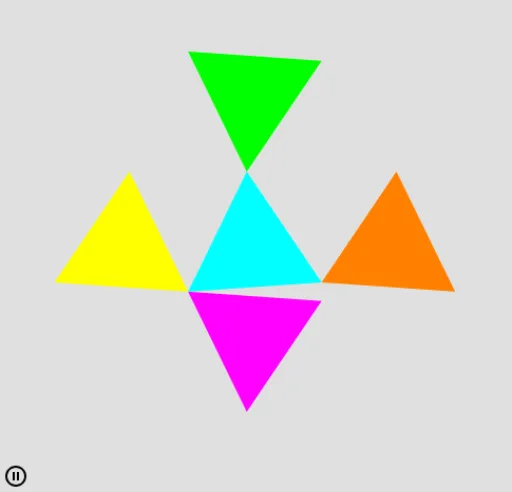
This example demonstrates the dynamic process of five triangles rolling sequentially. It involves core mathematical concepts such as rotation, normal distribution, integral, and geometric construction. The construction utilizes GeoGebra commands and objects like Point, Circle, Rotate, Polygon, OrthogonalLine, Mirror. Suitable for high school and above students to understand geometric transformations and calculus applications.
GeoGebra Commands & Parameters
Point(xAxis) → ACircle(A, 1) → cRotate((1, 0), n) → BRotate((1, 0), n + (2 * π / 3)) → CPolygon(B, C, 3) → poly1, f, g, h, DOrthogonalLine(C, yAxis) → iOrthogonalLine(B, yAxis) → jOrthogonalLine(D, yAxis) → kMirror(poly1, i) → poly1'Mirror(poly1, j) → poly1'_1Mirror(poly1, k) → poly1'_2Mirror(poly1, i) → poly1'_3Mirror(poly1, k) → poly1'_4Mirror(poly1, i) → poly1'_5Mirror(poly1, j) → poly1'_6Mirror(poly1, k) → poly1'_7OrthogonalLine(B, xAxis) → lOrthogonalLine(D, xAxis) → mOrthogonalLine(C, xAxis) → pMirror(poly1, l) → poly1'_8Mirror(poly1, m) → poly1'_9Mirror(poly1, p) → poly1'_{10}Mirror(poly1, l) → poly1'_{11}Mirror(poly1, p) → poly1'_{12}Mirror(poly1, l) → poly1'_{13}Mirror(poly1, m) → poly1'_{14}
AI Drawing Prompt Reference
On a coordinate plane, pick a point on the x-axis as the center of a unit circle. Mark three points on the circle in counterclockwise order, forming an equilateral triangle, with the first point on the positive x-axis and the other two rotated by 120 and 240 degrees. Then, draw perpendicular lines from each vertex to both the x-axis and y-axis. Using these lines as axes of symmetry, reflect the triangle multiple times to create a series of triangles that appear to roll around the circle, showing a dynamic pattern of rotation and symmetry.
The prompt above was compiled from the original drawing commands and is for reference only.