
Finding the Next Two Terms of a Sequence Using the Method of Differences
Loading the math board and drawing, please wait…
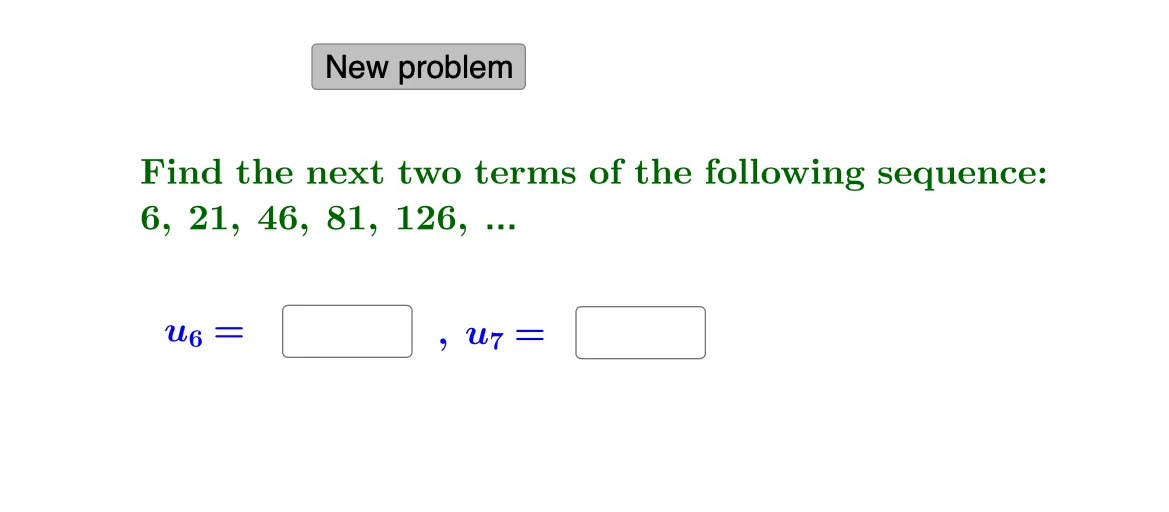
① This example demonstrates how to use the method of differences (successive subtraction) to find the next two terms of a sequence, with interactive input for verification. ② The core mathematical concept is finite differences: by examining first, second, or higher-order differences, one can extrapolate the pattern to predict future terms. ③ Construction details: GeoGebra commands include RandomElement and Random to generate random sequences, Sequence to build difference lists, Textfield and InputBox for user input, If to check correctness, and button1 to generate a new sequence. Key objects are lists l1, l2, l3, sequence terms u_1 through u_7, and text objects text1-text4 for instructions and feedback. ④ This is suitable for middle or high school students learning sequences, as well as for math competition preparation, providing a hands-on way to understand and verify the difference method.
GeoGebra Commands & Parameters
RandomElement(l1) → aRandomElement(l2) → bRandomElement(l1) → cRandom(1, 3) → dSequence((a * n^(d)) + c, n, 1, 7) → l3Textfield(e) → InputBox1Textfield(f) → InputBox2If(u_6 ≟ e ∧ u_7 ≟ f, "Correct!", "No. Try again.") → text4
AI Drawing Prompt Reference
Create an interactive graphic demonstrating how to find the next two terms of a sequence using the method of differences. Include a randomly generated sequence and input boxes for user verification. Show the first and second-order differences of the sequence, and guide users to predict the next term by observing the pattern in the difference lists. The graphic should feature the sequence, difference lists, user input boxes, feedback text for correctness, and a button to generate new sequences.
The prompt above was compiled from the original drawing commands and is for reference only.