
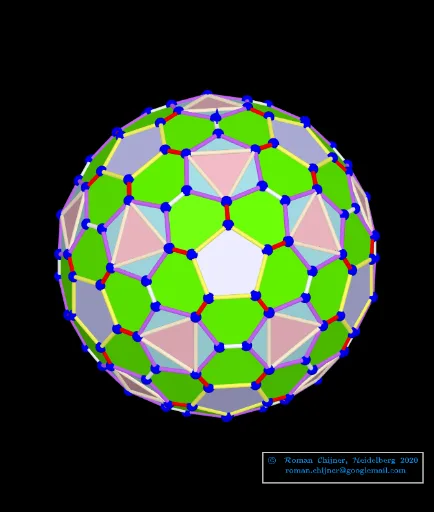
Finding and coloring edges and faces of a polyhedron and its dual image
Loading the math board and drawing, please wait…
This example demonstrates how to find and color the edges and faces of a polyhedron and its dual image. Key mathematical concepts include geometric transformations, volume calculations, and optimization problems. Construction involves using GeoGebra commands such as Sequence, Sphere, Circle, and others to build objects, with parameter adjustments for dynamic visualization. Suitable for high school students or college undergraduates learning solid geometry and optimization techniques.
GeoGebra Commands & Parameters
Sequence(((zoom * Element[Element[A00, i], 1]), (zoom * Element[Element[A00, i], 2]), (zoom * Element[Element[A00, i], 3])), i, 1, Length[A00]) → A0Sequence(((zoom * Element[Element[A00d, i], 1]), (zoom * Element[Element[A00d, i], 2]), (zoom * Element[Element[A00d, i], 3])), i, 1, Length[A00d]) → A0dSphere(O, r_o) → sp02dTextfield(R1sphere) → InputBox5Sphere(O, R1sphere) → sp01Textfield(r_o) → InputBox6Textfield(jarc) → InputBox8Textfield(jarc_d) → InputBox9Textfield(f_{Poly}) → InputBox11Textfield(k) → InputBox15Textfield(k_d) → InputBox14TableText({Append["i", 1…Length[mm5a]], Append["\fgcolor{orange}{n}", mm5a], Append["\fgcolor{orange}{N}", mm7a], Append["\fgcolor{#007FFF}{n/dual}", mm5ad], Append["\fgcolor{#007FFF}{N}", mm7ad]}, "hr") → text24Textfield(iseg) → InputBox17Textfield(f_{Poly}d) → InputBox18Textfield(isegd) → InputBox19UnicodeToLetter(34) → u34TableText({Append["i", 1…Max[Length[Segn], Length[Segnd]]], Append["\fgcolor{orange}{s_i}", Segn / Segments_o1], Append["\fgcolor{orange}{N}", lLength], Append["\fgcolor{#007FFF}{s_id}", Segnd / Segments_o1d], Append["\fgcolor{#007FFF}{N}", lLengthd]}, "hr") → text23Textfield(n_3) → InputBox20If(n_3 ≟ 0, "", Text["" + n_3]) → txt_3Textfield(nd_3) → InputBox21If(nd_3 ≟ 0, "", Text["" + nd_3]) → txtd_3Circle(A_{farbe}, rfabe) → farbekreisPointIn(farbekreis) → AAngle(A) → αSegment(C, D) → hSort(Sequence[Segment[Element[A0, Element[Element[nom, i], 1]], Element[A0, Element[Element[nom, i], 2]]], i, 1, Length[nom]]) → SegmentsFirst(Segments, i_s) → Segments_oSort(Sequence[Segment[Element[A0d, Element[Element[nomd, i], 1]], Element[A0d, Element[Element[nomd, i], 2]]], i, 1, Length[nomd]]) → SegmentsdFirst(Segmentsd, id_s) → Segmentsd_oKeepIf(round((x * 10^(k))) / 10^(k) ≟ Element[Segn, 1], Segments) → la1KeepIf(round((x * 10^(k))) / 10^(k) ≟ Element[Segn, 2], Segments) → la2KeepIf(round((x * 10^(k))) / 10^(k) ≟ Element[Segn, 3], Segments) → la3KeepIf(round((x * 10^(k))) / 10^(k) ≟ Element[Segn, 4], Segments) → la4KeepIf(round((x * 10^(k))) / 10^(k) ≟ Element[Segn, 5], Segments) → la5KeepIf(round((x * 10^(k))) / 10^(k) ≟ Element[Segn, 6], Segments) → la6KeepIf(round((x * 10^(k))) / 10^(k) ≟ Element[Segn, 7], Segments) → la7KeepIf(round((x * 10^(k))) / 10^(k) ≟ Element[Segn, 8], Segments) → la8KeepIf(round((x * 10^(k))) / 10^(k) ≟ Element[Segn, 9], Segments) → la9KeepIf(round((x * 10^(k))) / 10^(k) ≟ Element[Segn, 10], Segments) → la10Sequence(Polygon[Element[A0, Element[Element[mm1, f], 1]], Element[A0, Element[Element[mm1, f], 2]], Element[A0, Element[Element[mm1, f], 3]]], f, 1, Length[mm1]) → poly_{3}KeepIf(round((x * 10^(k))) / 10^(k) ≟ Element[poly_{3}S, 1], poly_{3}) → poly_{3}1KeepIf(round((x * 10^(k))) / 10^(k) ≟ Element[poly_{3}S, 2], poly_{3}) → poly_{3}2Sequence(Polygon[Sequence[A0(mm6(1, f, k)), k, 1, Length[mm6(1, 1)]]], f, 1, Length[mm6(1)]) → poly_{5}Sequence(Polygon[Sequence[A0(mm6(2, f, k)), k, 1, Length[mm6(2, 1)]]], f, 1, Length[mm6(2)]) → poly_{6}KeepIf(round((x * 10^(k))) / 10^(k) ≟ Element[Segnd, 1], Segmentsd) → lad1KeepIf(round((x * 10^(k))) / 10^(k) ≟ Element[Segnd, 2], Segmentsd) → lad2KeepIf(round((x * 10^(k))) / 10^(k) ≟ Element[Segnd, 3], Segmentsd) → lad3KeepIf(round((x * 10^(k))) / 10^(k) ≟ Element[Segnd, 4], Segmentsd) → lad4KeepIf(round((x * 10^(k))) / 10^(k) ≟ Element[Segnd, 5], Segmentsd) → lad5Sequence(Polygon[Element[A0d, Element[Element[mm1d, f], 1]], Element[A0d, Element[Element[mm1d, f], 2]], Element[A0d, Element[Element[mm1d, f], 3]]], f, 1, Length[mm1d]) → polyd_{3}KeepIf(round((x * 10^(k))) / 10^(k) ≟ Element[poly_{3}Sd, 1], polyd_{3}) → polyd_{3}1KeepIf(round((x * 10^(k))) / 10^(k) ≟ Element[poly_{3}Sd, 2], polyd_{3}) → polyd_{3}2KeepIf(round((x * 10^(k))) / 10^(k) ≟ Element[poly_{3}Sd, 3], polyd_{3}) → polyd_{3}3
AI Drawing Prompt Reference
Draw a polyhedron and its dual image, and mark their edges and faces. Start by drawing the polyhedron, then draw its dual image. Next, identify and mark the edges and faces of the polyhedron and its dual image. Finally, adjust parameters to achieve dynamic visualization.
The prompt above was compiled from the original drawing commands and is for reference only.