
Find the Missing Supplementary Angle
Loading the math board and drawing, please wait…
In collections
Introduction to Angles
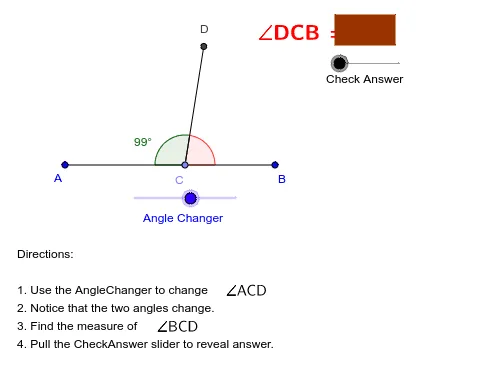
This example demonstrates the concept of supplementary angles. By creating a figure, find the missing angle. It uses commands like Segment, Point, Rotate, Angle, Polygon, Vector, Translate. Suitable for middle school and above students to practice supplementary angles.
GeoGebra Commands & Parameters
Segment(A, B) → aPoint(a) → CRotate(A, -AngleChanger, C) → DAngle(D, C, A) → βSegment(C, D) → bAngle(B, C, D) → γPolygon(E, F, G, H) → P, e, f, g, hVector((0, 0), (CheckAnswer, 0)) → uTranslate(E, u) → E'Translate(F, u) → F'Translate(G, u) → G'Translate(H, u) → H'Polygon(E', F', G', H') → P', e', f', g', h'
AI Drawing Prompt Reference
Draw a line segment and pick a point on it. Rotate the segment around the point to form another segment. Measure the angles formed by the two segments and the original segment, where one angle is known and the other is to be found as the supplement. Then, create a quadrilateral using four segments and translate it horizontally to observe the relationship between the original and translated shapes.
The prompt above was compiled from the original drawing commands and is for reference only.