
Finding a Complementary Angle
Loading the math board and drawing, please wait…
In collections
Introduction to Angles
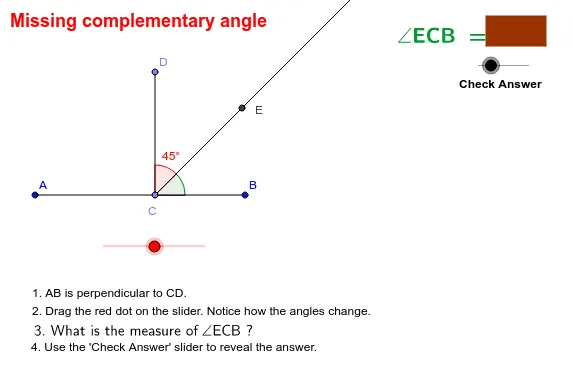
This example demonstrates how to construct and find a missing complementary angle in a figure. The core math concept is the relationship between complementary angles, where the sum of two angles equals 90 degrees. Construction involves using GeoGebra commands and objects such as Line, Point, OrthogonalLine, Segment, Rotate, Angle, Ray, Polygon, Vector, and Translate. It is suitable for middle school mathematics education, helping students understand and practice complementary angle calculations and constructions.
GeoGebra Commands & Parameters
Line(A, B) → aPoint(a) → COrthogonalLine(C, a) → bSegment(A, B) → dPoint(b) → DSegment(C, D) → eRotate(D, -α, C) → EAngle(E, C, D) → βRay(C, E) → cAngle(B, C, E) → γPolygon(F, G, H, I) → P, f, g, h, iVector((8, 6), (8 + j, 6)) → uTranslate(F, u) → F'Translate(G, u) → G'Translate(H, u) → H'Translate(I, u) → I'Polygon(F', G', H', I') → P', f', g', h', i'
AI Drawing Prompt Reference
Draw a right triangle and identify one acute angle, then find its complement. Start by drawing a line segment, then pick a point on it and draw a perpendicular line through the point. Connect the foot of the perpendicular to another point on the segment. Rotate the line connecting these two points by the acute angle around the foot of the perpendicular to form the complement. Highlight the complement area with a polygon and copy the entire figure to the right side.
The prompt above was compiled from the original drawing commands and is for reference only.