
Fatih Sultan Mehmet Han Geometric Construction
Loading the math board and drawing, please wait…
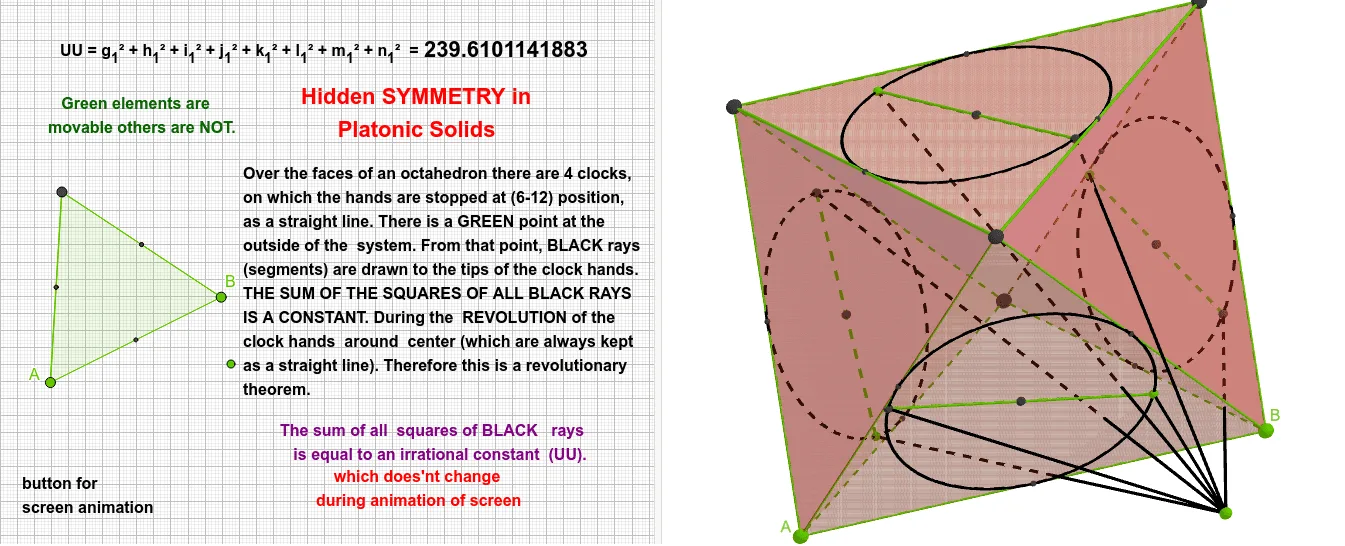
This example, titled 'Fatih Sultan Mehmet Han', constructs a complex geometric figure combining polygons, circles, an octahedron, and 3D surfaces, demonstrating the integration of polyhedra with planar geometric elements. Core mathematical concepts include centroid (barycenter), circumscribed and inscribed circles, general quadrilaterals, power functions, symmetry, geometric transformations, 3D vectors, and hyperbolas, highlighting connections between 2D and 3D geometry. Construction details: using GeoGebra commands such as Polygon, Octahedron, Midpoint, Circle, Point, Centroid, Line, Intersect, and Segment, it creates multiple faces (e.g., faceACF, faceADF) and edges (edgeAF, edgeCF), along with text objects (text1, etc.), auxiliary points (G, H, I), and curves (f, g, h, t1). Suitable for high school and above for teaching solid geometry, geometric transformations, and polyhedron properties, as well as for exploring mathematical art and geometric construction.
GeoGebra Commands & Parameters
Polygon(A, B, 3) → poly1, f, g, h, COctahedron(poly1, true) → a, D, faceDEF, edgeAF, edgeCF, edgeAD, edgeDF, edgeBD, edgeBE, edgeDE, edgeCE, edgeEF, E, F, faceACF, faceADF, faceABD, faceBDE, faceBCE, faceCEFMidpoint(B, C) → GMidpoint(C, A) → HMidpoint(B, A) → IPolygon(E, D, F) → t1, f_1, e, d_1Midpoint(D, E) → JMidpoint(E, F) → KMidpoint(F, D) → LCircle(J, K, L) → cPolygon(C, E, B) → t3, b_1, c_2, e_1Midpoint(C, E) → MMidpoint(E, B) → NMidpoint(B, C) → OCircle(M, N, O) → kPolygon(C, F, A) → t4, a_2, c_3, f_2Midpoint(C, F) → PMidpoint(F, A) → QMidpoint(A, C) → RCircle(P, Q, R) → pPolygon(A, D, B) → t2, b, a_1, dMidpoint(D, A) → SMidpoint(D, B) → TCircle(S, I, T) → qPoint(c) → UPoint(q) → VCentroid(t1) → WPoint(p) → ZPoint(k) → A_1Centroid(t2) → B_1Centroid(t3) → C_1Centroid(t4) → D_1Line(U, W) → iIntersect(i, c, 1) → E_1Segment(U, E_1) → jLine(V, B_1) → lIntersect(l, q, 1) → F_1Segment(V, F_1) → mLine(A_1, C_1) → nIntersect(n, k, 1) → G_1Segment(A_1, G_1) → rLine(Z, D_1) → sIntersect(s, p, 1) → H_1Segment(Z, H_1) → tSegment(Z, I_1) → g_1Segment(H_1, I_1) → h_1Segment(A_1, I_1) → i_1Segment(G_1, I_1) → j_1Segment(V, I_1) → k_1Segment(F_1, I_1) → l_1Segment(U, I_1) → m_1Segment(E_1, I_1) → n_1
AI Drawing Prompt Reference
Create a complex geometric figure combining polygons, circles, an octahedron, and 3D surfaces, showcasing the integration of polyhedra with planar elements. The central structure is an octahedron surrounded by multiple polygons and circles, connected by midpoints and circle centers to form intricate patterns. Begin with the octahedron, then add polygons and circles, linking them through midpoints and centers, and refine with lines and intersections to highlight geometric transformations and symmetry.
The prompt above was compiled from the original drawing commands and is for reference only.