
Factoring Area Model
Loading the math board and drawing, please wait…
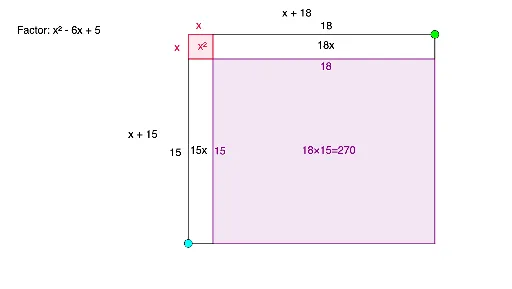
This example demonstrates the correspondence between factoring quadratic polynomials and area models using dynamic geometry. It involves core concepts like quadratic equations, quadratic functions, geometric area, and algebraic operations. Constructed with GeoGebra commands such as Random, Simplify, Point, Intersect, Polygon, Expand, Segment, Centroid, and Midpoint, and objects like r1, r2, f, g, A, B, poly1, etc. Suitable for middle school and high school students learning polynomial factoring, geometric intuition, and the integration of algebra and geometry.
GeoGebra Commands & Parameters
Random(1, 12) → r1Random(1, 12) → r2Simplify(x - r1) → fSimplify(x - r2) → gPoint(xAxis) → AIntersect(xAxis, yAxis) → BPolygon(A, B, 4) → poly1, i, j, k, l, C, DExpand((f(x) * g(x))) → pPoint(Ray[A, (3, 0)]) → EPoint(Ray[C, (0, -3)]) → FSegment(A, E) → hSegment(C, F) → mPolygon(D, (x(E), y(D)), (x(E), y(F)), (x(D), y(F))) → q1, d, n, q, rCentroid(q1) → GSegment(E, (x(E), -2)) → sSegment(F, (2, y(F))) → tMidpoint(D, E) → HMidpoint(D, F) → I
AI Drawing Prompt Reference
Draw an area model for factoring a quadratic polynomial. Start with two random integer points on the x-axis as roots, and draw the corresponding linear factors. Construct a rectangle with one vertex at the origin and sides along the axes, whose dimensions relate to these roots. Then, from points on the rectangle's sides, draw segments to subdivide it into smaller rectangles, visually representing the expanded terms. Mark the centroids of these sub-rectangles and connect relevant midpoints to highlight the area relationships. The final figure should include axes, the main rectangle, subdivision segments, centroid markers, and connecting lines, all illustrating the algebraic expansion geometrically.
The prompt above was compiled from the original drawing commands and is for reference only.