
Exploring Volume by Janet Bowers
Loading the math board and drawing, please wait…
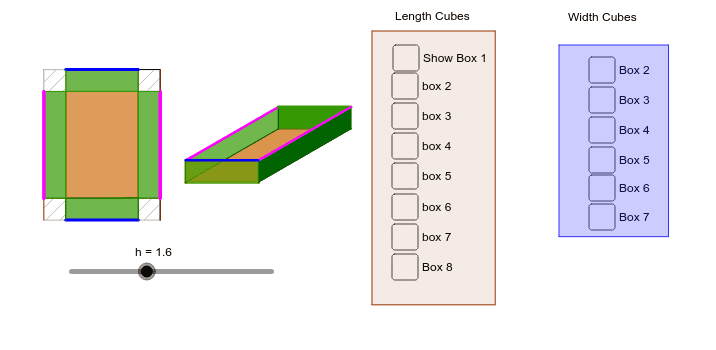
This example demonstrates the concept of volume through geometric construction. It involves core concepts from integral calculus and solid geometry. Using GeoGebra commands such as Circle, Vector, Translate, Intersect, etc., users can dynamically explore the volumes of different shapes. Suitable for high school or university calculus and solid geometry courses.
GeoGebra Commands & Parameters
Circle(Origin, len - (2 * h)) → cVector((width - (2 * h), 0)) → uTranslate(A, u) → A'Intersect(c, xAxis) → B, CRotate(C, α) → C'Vector(C') → vTranslate(A, v) → A'_1Translate(A', v) → A''Polygon(A, A'_1, A'', A') → poly1, a, a'_1, a'', a'Vector((0, h)) → wTranslate(A, w) → A'_2Translate(A', w) → A''_1Translate(A'_1, w) → DTranslate(A'', w) → A'''Segment(A'_2, A) → bSegment(A''_1, A') → dSegment(D, A'_1) → eSegment(A''', A'') → fPolygon(A'_2, A''_1, A', A) → poly2, a'_2, a''_1, a'_3, a_1Polygon(D, A''', A'', A'_1) → poly3, d_1, a''', a''_2, a'_4Polygon(A''_1, A''', A'', A') → poly4, a''_3, a'''_1, a''_4, a'_5Polygon(D, A'_2, A, A'_1) → poly5, d_2, a'_6, a_2, a'_7Rotate(E, α) → E'Vector(E') → gSegment(W_1, A_2) → c_7Segment(A_2, Z_1) → d_7Segment(Z_1, V_1) → e_7Segment(V_1, W_1) → f_7Segment(Paper, U_1) → g_7Segment(U_1, S_1) → h_7Segment(S_1, T_1) → i_7Segment(T_1, Paper) → j_7OrthogonalLine(Z_1, g_7) → m_7OrthogonalLine(Z_1, h_7) → n_7OrthogonalLine(A_2, h_7) → a_8OrthogonalLine(W_1, i_7) → b_8Intersect(j_7, a_8) → B_2Intersect(i_7, b_8) → C_2Intersect(m_7, i_7) → D_2Intersect(h_7, a_8) → E_2Intersect(n_7, h_7) → F_2Intersect(m_7, g_7) → G_2Intersect(g_7, b_8) → H_2Intersect(n_7, j_7) → I_2Polygon(B_2, W_1, 4) → poly26, c_8, d_8, e_8, f_8, J_2, K_2Polygon(Paper, H_2, 4) → poly27, g_8, h_8, i_8, j_8, L_2, M_2Polygon(G_2, U_1, 4) → poly28, k_8, l_8, m_8, n_8, N_2, O_2Polygon(A_2, E_2, 4) → poly29, p_8, q_8, r_8, s_8, P_2, Q_2Polygon(V_1, Z_1, A_2, W_1) → poly31, v_1, z_1, a_9, w_1newbox(α, E, G) → n, p, c_1, e_1, f_1, g_1, h_1, i_1, j_1, k_1, J, q, H, poly6, poly7, r, s, t, b_1Intersect(r, i_1) → KIntersect(r, i_1) → LIntersect(r, e_1) → MPolygon(J, M, H, G) → poly8, j_2, m_1, h_2, g_2Polygon(B_2, W_1, V_1, I_2) → poly9, b_2, w_2, v_2, i_2Polygon(W_1, A_2, D_2, C_2) → poly10, w_3, a_3, d_3, c_2Point(w_3) → NPolygon(N, Z_1, F_2, E_2) → poly11, n_1, z_2, f_2, e_2Point(n_1) → OPoint(w_2) → PPolygon(H_2, G_2, O, P) → poly12, h_3, g_3, o, p_1blackbox(α, E, Q) → poly13, poly14, r_1, s_1, t_1, k_2, l_2, m_2, n_2, p_2, q_2, r_2, poly15, s_2, t_2, i, j, k, l, m, l_1, q_1blackbox(α, E, R) → poly16, poly17, l_3, m_3, n_3, p_3, q_3, r_3, s_3, t_3, a_4, b_4, poly18, c_4, d_4, b_3, c_3, e_3, f_3, i_3, j_3, k_3blackbox(α, E, S) → poly19, poly20, l_4, m_4, n_4, p_4, q_4, r_4, s_4, t_4, a_5, b_5, poly21, c_5, d_5, e_4, f_4, g_4, h_4, i_4, j_4, k_4blackbox(α, E, T) → poly22, poly23, l_5, m_5, n_5, p_5, q_5, r_5, s_5, t_5, a_6, b_6, poly24, c_6, d_6, e_5, f_5, g_5, h_5, i_5, j_5, k_5blackbox(α, E, V) → poly33, poly34, c_9, d_9, e_9, f_9, g_9, h_9, i_9, j_9, k_9, l_9, poly35, m_9, n_9, p_7, q_7, r_7, s_7, t_7, t_8, b_9blackbox(α, E, W) → poly36, poly37, c_{10}, d_{10}, e_{10}, f_{10}, g_{10}, h_{10}, i_{10}, j_{10}, k_{10}, l_{10}, poly38, m_{10}, n_{10}, p_9, q_9, r_9, s_9, t_9, a_{10}, b_{10}blackbox(α, E, A_1) → poly42, poly43, c_{12}, d_{12}, e_{12}, f_{12}, g_{12}, h_{12}, i_{12}, j_{12}, k_{12}, l_{12}, poly44, m_{12}, n_{12}, p_{11}, q_{11}, r_{11}, s_{11}, t_{11}, a_{12}, b_{12}blackbox(α, E, B_1) → poly45, poly46, c_{13}, d_{13}, e_{13}, f_{13}, g_{13}, h_{13}, i_{13}, j_{13}, k_{13}, l_{13}, poly47, m_{13}, n_{13}, p_{12}, q_{12}, r_{12}, s_{12}, t_{12}, a_{13}, b_{13}blackbox(α, E, C_1) → poly48, poly49, c_{14}, d_{14}, e_{14}, f_{14}, g_{14}, h_{14}, i_{14}, j_{14}, k_{14}, l_{14}, poly50, m_{14}, n_{14}, p_{13}, q_{13}, r_{13}, s_{13}, t_{13}, a_{14}, b_{14}blackbox(α, E, D_1) → poly51, poly52, c_{15}, d_{15}, e_{15}, f_{15}, g_{15}, h_{15}, i_{15}, j_{15}, k_{15}, l_{15}, poly53, m_{15}, n_{15}, p_{14}, q_{14}, r_{14}, s_{14}, t_{14}, a_{15}, b_{15}blackbox(α, E, E_1) → poly54, poly55, c_{16}, d_{16}, e_{16}, f_{16}, g_{16}, h_{16}, i_{16}, j_{16}, k_{16}, l_{16}, poly56, m_{16}, n_{16}, p_{15}, q_{15}, r_{15}, s_{15}, t_{15}, a_{16}, b_{16}blackbox(α, E, F_1) → poly57, poly58, c_{17}, d_{17}, e_{17}, f_{17}, g_{17}, h_{17}, i_{17}, j_{17}, k_{17}, l_{17}, poly59, m_{17}, n_{17}, p_{16}, q_{16}, r_{16}, s_{16}, t_{16}, a_{17}, b_{17}blackbox(α, E, G_1) → poly60, poly61, c_{18}, d_{18}, e_{18}, f_{18}, g_{18}, h_{18}, i_{18}, j_{18}, k_{18}, l_{18}, poly62, m_{18}, n_{18}, p_{17}, q_{17}, r_{17}, s_{17}, t_{17}, a_{18}, b_{18}Segment(A''_1, A''') → e_6Segment(A'_2, A''_1) → f_6Polygon(T_2, V_2, W_2, U_2) → poly25, t_6, v_6, w_5, u_6Polygon(S_2, Z_2, B_3, A_3) → poly30, s_6, z_3, b_7, a_7
AI Drawing Prompt Reference
Draw a solid geometry figure, starting with a circle c, a width vector u passing through the center of the circle, and a rectangle formed by the intersection points B and C of the circle with the x-axis. Use rotations and translations to create multiple parallelograms and trapezoids, ultimately forming a complex 3D shape with multiple faces and edges.
The prompt above was compiled from the original drawing commands and is for reference only.