
Surface Area Calculation Example
Loading the math board and drawing, please wait…
In collections
Modeling Volume as a function of height
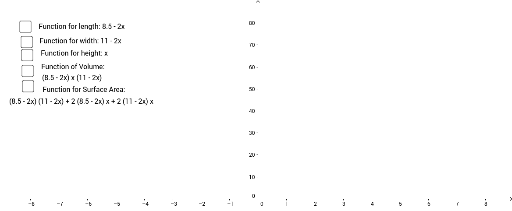
This example demonstrates how to graph and calculate the surface area of 3D shapes (e.g., rectangular prisms) using GeoGebra. Key math concepts include surface area formulas for geometric solids, 3D coordinates, and variable calculations. Construction highlights from the summary involve commands/objects like Len (length), wid (width), ht (height), SA (surface area), f (function), a, b, c (parameters), and Slider (animation). Suitable for high school students and teachers studying solid geometry, calculus, and geometric computations.
GeoGebra Commands & Parameters
Len(x) = 8.5 - (2 * x)wid(x) = 11 - (2 * x)ht(x) = xSA(x) = (Len(x) * wid(x)) + ((2 * Len(x)) * ht(x)) + ((2 * wid(x)) * ht(x))f(x) = ((Len(x) * ht(x)) * wid(x))Boolean a(false)Boolean b(false)Boolean c(false)Boolean d(false)Boolean e(false)
AI Drawing Prompt Reference
Draw a 3D rectangular prism whose length, width, and height are defined by a variable x: length equals 8.5 minus 2x, width equals 11 minus 2x, and height equals x. Display the surface area function (length times width plus twice length times height plus twice width times height) and the volume function (length times width times height). Use a slider to control x, and include five boolean toggles to show or hide labels for length, width, height, surface area, and volume. The figure should dynamically update as x changes, with key dimensions annotated.
The prompt above was compiled from the original drawing commands and is for reference only.