
Exploring Tangent Function Transformations
Loading the math board and drawing, please wait…
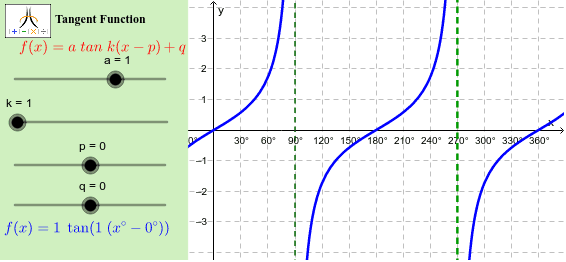
This example demonstrates the effects of vertical and horizontal transformations on the tangent function. It involves core mathematical concepts such as function transformations, tangent function graphs, asymptotes, and analytical geometry. The construction uses GeoGebra commands like Corner, Polygon, and Asymptote, with objects including a, k, p, q, f, text elements, points, panels, and frames. It is suitable for high school students studying function transformations, calculus, and analytical geometry.
GeoGebra Commands & Parameters
Corner(1, 1) → Cnr1Corner(1, 2) → Cnr2Corner(1, 3) → Cnr3Corner(1, 4) → Cnr4Polygon(CN1, CN2, CN3, CN4) → Panel, cn1, cn2, cn3, cn4Polygon(Cnr1, Cnr2, Cnr3, Cnr4) → Frame, cnr1, cnr2, cnr3, cnr4Asymptote(f) → list1
AI Drawing Prompt Reference
Draw the transformations of the tangent function, including vertical and horizontal transformations. Start by drawing four corner points, then use these points to create two frames: one for the control panel and another for the display area. Finally, draw the asymptotes of the tangent function.
The prompt above was compiled from the original drawing commands and is for reference only.