
Exploring Rotations in the Coordinate Plane (Part 4)
Loading the math board and drawing, please wait…
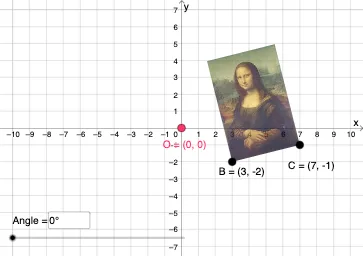
This GeoGebra example demonstrates how to build and visualize geometric correspondences on the coordinate plane using rotations and related transformations. It highlights the observable relationship between a figure before and after rotation by a specified angle around a chosen center, making the transformation feel concrete and interactive. The key mathematics includes geometric transformations—especially rotation—together with vector-based positioning, translation, and the role of angle parameters. Construction is carried out with GeoGebra commands such as Vector and Translate for directed positioning, Rotate for the central rotation action, and CircleArc, Circle, Line, and Intersect to create arcs, circles, lines, and their intersection points. Additional tools like Mirror and Dilate support symmetry and scaling-based auxiliary constructions, while Textfield is used to label and control parameters (angles such as α, β, γ). The target audience is middle and high school learners studying coordinate geometry and transformation geometry, as well as anyone using GeoGebra for interactive construction practice.
GeoGebra Commands & Parameters
Vector(D, E) → uTranslate(pic1, u) → pic1'Translate(B, u) → B'_{4}Translate(C, u) → C'_{4}Vector(B, B'_{4}) → vRotate(C, δ, O) → C'CircleArc(O, C', C) → cCircleArc(O, C, C') → dCircle(O, C) → eLine(F, G) → fMirror(pic1, f) → pic1'_2Mirror(B, f) → B'_2Mirror(C, f) → C'_2Dilate(pic1, k, O) → pic1'_3Dilate(B, k, O) → B'_3Dilate(C, k, O) → C'_3Rotate(B, δ, O) → B'Rotate(pic1, δ, O) → pic1'_1Circle(O, C) → pCircleArc(O, C', C) → rTextfield(δ) → InputBox1Textfield(k) → InputBox2Intersect(q, eq1) → H
AI Drawing Prompt Reference
Visualize the rotation of a shape around a central point by a specified angle on a coordinate plane. Start by drawing the original shape and the rotation center, then use vector positioning and translation to create the rotated figure. Illustrate the rotation path with arcs and circles, and demonstrate symmetry through lines and mirror operations. Label the rotation angle and scale parameter with text annotations to make the transformation clear.
The prompt above was compiled from the original drawing commands and is for reference only.