
Interactive Construction Linking Conic-Curve Geometry, Angles, and Transformatio
Loading the math board and drawing, please wait…
In collections
Simplifying Radicals: Geometric Thin Slice
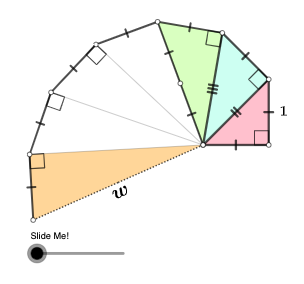
This example demonstrates how to build an interactive geometric configuration in GeoGebra by combining circles, segments, and angle measurements, so that parameter changes reveal angle relationships and the resulting intersection structure—supporting a conic-section style investigation task. Key concepts include polygon and segment geometry, circle–line intersections, explicit angle construction/measurement, vector representation, and geometric transformations (rotation, dilation/scale, and translation) that reorganize the configuration while preserving relevant relationships. Construction highlights from the provided command set: Polygon, Segment, and OrthogonalLine form the main polygonal and auxiliary (perpendicular) lines; Circle together with Intersect computes intersection points; Angle records the critical angular quantities; Midpoint and Vector encode positional and directional information; RotateText improves rotated labeling; Rotate and Dilate implement rotational and scaling effects; and Translate performs shifting of objects. The construction uses labeled objects (e.g., A, B, C) and parameter-driven variables (such as t1 and α) to create a coordinated, dynamic model. Suitable for secondary to early university students studying geometric construction, transformations, and geometry-to-measurement workflows (and optionally connecting measured geometric quantities to probability/statistical reasoning).
GeoGebra Commands & Parameters
Polygon(A, B, C) → t1, c, a, bOrthogonalLine(C, b) → fCircle(C, 1) → dIntersect(d, f, 1) → DSegment(A, D) → gOrthogonalLine(D, g) → hCircle(D, 1) → eIntersect(e, h, 2) → ESegment(A, E) → iOrthogonalLine(E, i) → jCircle(E, 1) → kIntersect(k, j, 2) → FSegment(A, F) → lOrthogonalLine(F, l) → mCircle(F, 1) → pIntersect(p, m, 2) → GSegment(A, G) → nOrthogonalLine(G, n) → qCircle(G, 1) → rIntersect(r, q, 2) → HSegment(A, H) → sOrthogonalLine(H, s) → tCircle(H, 1) → c_1Intersect(c_1, t, 2) → ISegment(A, I) → f_1OrthogonalLine(I, f_1) → g_1Circle(I, 1) → d_1Segment(C, D) → m_2Segment(D, E) → n_2Segment(E, F) → p_2Segment(F, G) → q_2Segment(G, H) → r_2Segment(H, I) → s_2Angle(C, B, A) → αAngle(D, C, A) → βAngle(E, D, A) → γAngle(F, E, A) → δAngle(G, F, A) → εAngle(H, G, A) → ζAngle(I, H, A) → ηSegment(A, B) → l_3Segment(C, B) → m_3Segment(C, A) → n_3RotateText(text1_{1}, atand(Slope[n_3])) → text2RotateText(text3, atand(Slope[g])) → text4Midpoint(f_1) → SRotateText(text5, pi / 4) → text6RotateText(text7, atan(Slope[g])) → text8RotateText(text9, atand(Slope[i])) → text10Rotate(D, If[0 < o ≤ 1, ((-o) * pi / 3), ((-pi)) / 3], E) → D'Rotate(E, If[0 < o ≤ 1, ((-o) * pi / 3), ((-pi)) / 3], E) → E'Segment(D', E') → p_3Rotate(D', If[1 < o ≤ 2, ((-(o - 1)) * pi), (-pi)], D') → D''Rotate(E', If[1 < o ≤ 2, ((o - 1) * pi), pi], D') → E''Segment(D'', E'') → q_3Dilate(A, If[3 < o ≤ 4, 4 - o, 0], I) → A'Vector(A, A') → uTranslate(C, u) → C'Translate(A, u) → A'_{1}Segment(C', A'_{1}) → r_3Translate(C, u) → C'_{1}Angle(A, I, C'_{1}) → σRotate(C', If[4 < o ≤ 5, ((-(o - 4)) * σ), (-σ)], I) → C''Rotate(A'_{1}, If[4 < o ≤ 5, ((-(o - 4)) * σ), (-σ)], I) → USegment(C'', U) → s_3Segment(A, S) → t_3Segment(S, I) → a_3Rotate(C'', If[5 < o ≤ 6, ((o - 5) * pi), pi], S) → C'''Rotate(U, If[5 < o ≤ 6, ((-(o - 5)) * pi), (-pi)], S) → U'Segment(C''', U') → b_3Polygon(A, B, C) → t2, c_4, a_4, b_4Polygon(A, C, D) → t3, d_4, a_5, c_5Polygon(A, D, E) → t4, e_4, a_6, d_5Circle(A, Distance[A, C]) → k_4Polygon(A, H, I) → t5, i_5, a_7, h_5RotateText(text11, atand(Slope[t_3])) → text12
AI Drawing Prompt Reference
Create an interactive geometric figure with multiple circles, segments, and angles. Start by drawing a triangle, then place circles at each vertex and find their intersections with perpendicular lines. Connect these intersection points to form a new polygon, and measure the angles at each vertex. Apply rotations, scalings, and translations to the elements to reveal changes in angle relationships and intersection structures.
The prompt above was compiled from the original drawing commands and is for reference only.