
Exploring Rotations in the Coordinate Plane by Tim Brzezinski
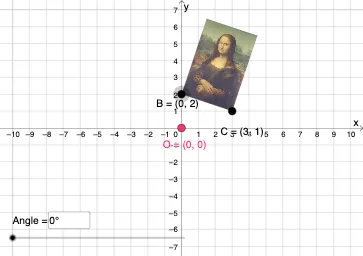
Loading the math board and drawing, please wait…
This example demonstrates how to perform rotations in the coordinate plane, involving core mathematical concepts such as coordinate geometry, trigonometry, and geometric transformations. Using GeoGebra commands and objects like Vector, Translate, Rotate, CircleArc, Circle, Line, Mirror, Dilate, Textfield, and Intersect, the rotation process and results can be visually represented. Suitable for high school students learning coordinate geometry and geometric transformations.
GeoGebra Commands & Parameters
Vector(D, E) → uTranslate(pic1, u) → pic1'Translate(B, u) → B'_{4}Translate(C, u) → C'_{4}Vector(B, B'_{4}) → vRotate(C, δ, O) → C'CircleArc(O, C', C) → cCircleArc(O, C, C') → dCircle(O, C) → eLine(F, G) → fMirror(pic1, f) → pic1'_2Mirror(B, f) → B'_2Mirror(C, f) → C'_2Dilate(pic1, k, O) → pic1'_3Dilate(B, k, O) → B'_3Dilate(C, k, O) → C'_3Rotate(B, δ, O) → B'Rotate(pic1, δ, O) → pic1'_1Circle(O, C) → pCircleArc(O, C', C) → rTextfield(δ) → InputBox1Textfield(k) → InputBox2Intersect(q, eq1) → H
AI Drawing Prompt Reference
Draw a coordinate plane with a figure undergoing geometric transformations. Start with a shape defined by points, then translate it along a vector, including its key points. Next, rotate the shape and points around the origin by an angle, showing circular arcs for the rotation paths. Then, reflect the shape and points across a line. After that, dilate the shape and points from the origin by a scale factor. Finally, include two input boxes to adjust the rotation angle and scale factor, and mark the intersection of the shape with a curve.
The prompt above was compiled from the original drawing commands and is for reference only.