
Exploring Parallelogram Properties
Loading the math board and drawing, please wait…
In collections
Investigating Quadrilaterals
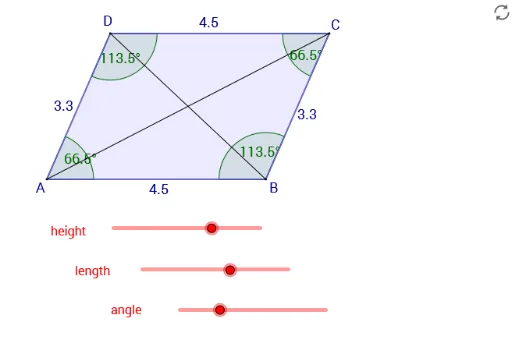
This example demonstrates the properties of a parallelogram through interactive exploration, visually showcasing features like parallel opposite sides and bisecting diagonals. Core math concepts include parallel lines, diagonals, angles, polygon construction, and coordinate geometry. It utilizes commands/objects like Line, Point, Segment, Intersect, Angle, Polygon, and Corner from GeoGebra. Suitable for middle school and above, ideal for geometric visualization and property verification.
GeoGebra Commands & Parameters
Line(B, a) → cPoint(a) → ASegment(B, A) → dIntersect(b, a) → DIntersect(c, b) → CSegment(D, A) → eSegment(D, C) → fSegment(B, C) → gAngle(B, A, D) → αAngle(A, D, C) → βAngle(D, C, B) → γAngle(C, B, A) → δPolygon(A, B, C, D) → poly1, a_1, b_1, c_1, d_1Segment(A, C) → hSegment(D, B) → iCorner(5) → E