
Exploring Cross Sections Through Rotational Solids
Loading the math board and drawing, please wait…
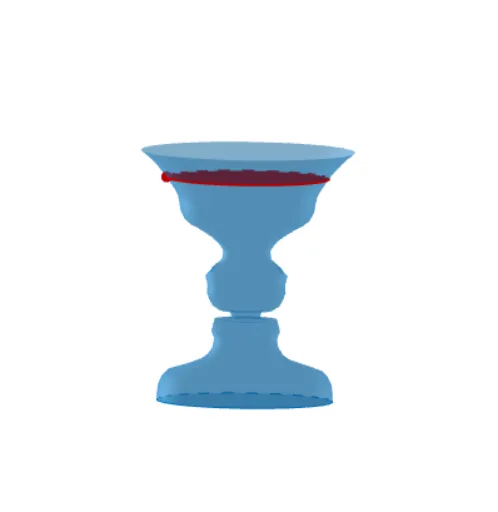
This example explores cross sections through rotational solids. It demonstrates the basic concepts of rotational solids, involving integral calculus, rotation, and solid geometry. It uses commands like Spline, CurveCartesian, Surface, etc., for construction. Suitable for high school math education and learning, especially for calculus and solid geometry courses.
GeoGebra Commands & Parameters
Spline({A, B, B_1, B_2, B_3, C, C_1, C_2, C_3, D, D_1, D_2, D_3, E, E_1, E_2, E_3, E_4, F, F_1, F_2, F_3, G, H, I, J, J_1, J_2, J_3, U}, 3) → aCurveCartesian(a(t / d), t, 0, d) → cSurface(c, (2 * π), yAxis) → bOrthogonalPlane(U, yAxis) → eOrthogonalLine(U, yAxis) → fIntersect(f, yAxis) → VSegment(V, U) → gCircle(V, g, yAxis) → hPoint(c) → KLine(K, xAxis) → jIntersect(j, yAxis) → LSegment(L, K) → kCircle(yAxis, L) → pCircle(yAxis, L) → qCircle(L, k, yAxis) → r
AI Drawing Prompt Reference
Draw a 3D solid formed by rotating a smooth curve around the vertical axis. Start by constructing a spline through a series of points in the plane, then revolve this curve around the y-axis to create a surface of revolution. Place a point on this surface, and through it draw a plane perpendicular to the y-axis, which intersects the solid in a circular cross-section. From the point, drop a perpendicular to the y-axis, and use this segment as a radius to draw a circle in the perpendicular plane, matching the cross-section. Also, on the y-axis, choose a point and draw a plane perpendicular to it, then in that plane draw a circle centered at that point with radius equal to the distance to the surface point, illustrating the rotational symmetry.
The prompt above was compiled from the original drawing commands and is for reference only.