
Exploring Alternate Interior Angles
Loading the math board and drawing, please wait…
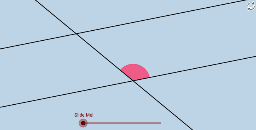
This example demonstrates the equality of alternate interior angles formed by parallel lines through rotating an angle 180 degrees. Key math concepts include parallel lines, alternate interior angles, and rotational symmetry. GeoGebra commands like Point, Rotate, Angle, Line, Circle, Intersect, CircleSector, Dilate, Vector, Translate, CircleArc, Midpoint, Segment, Ray are used to construct the geometry. Suitable for middle school and above students to understand properties of parallel lines and geometric transformations.
GeoGebra Commands & Parameters
Point(a) → BRotate(B, α, A) → B'Angle(B, A, B') → βLine(A, B') → bCircle(A, 1) → eIntersect(b, d) → CCircle(C, 1) → fIntersect(e, a) → D, EIntersect(e, b) → F, GIntersect(f, b) → H, IIntersect(f, d) → J, KCircleSector(C, J, H) → kCircleSector(C, H, K) → pCircleSector(A, E, G) → qCircleSector(A, G, D) → rCircleSector(A, F, E) → tDilate(A, If[0 < i < 1, 1 - i], C) → A'Vector(A, A') → uTranslate(t, u) → t'CircleArc(A, E, G) → c_1CircleArc(A, G, D) → f_1CircleArc(C, J, H) → h_1Vector(A, C) → vMidpoint(C, A) → LRotate(q, (((-i) * 180))°, L) → q'Rotate(A, (((-i) * 180))°, L) → A'_1Segment(L, A'_1) → gSegment(C, L) → nSegment(L, A) → sPoint(b) → MPoint(b) → NRay(C, M) → a_1Ray(A, N) → b_1Rotate(E, (((-i) * 180))°, L) → E'Ray(A'_1, E') → d_1Circle(A'_1, Distance[L, A'_1]) → e_1Intersect(e_1, d_1, 1) → OSegment(A'_1, O) → g_1Rotate(r, ((i * 180))°, L) → r'_2Rotate(A, ((i * 180))°, L) → A'_2Rotate(D, ((i * 180))°, L) → D'Segment(L, A'_2) → hCircle(A'_2, L) → k_1Ray(A'_2, D') → i_1Intersect(k_1, i_1) → P,Segment(A'_2, P) → j_1
AI Drawing Prompt Reference
Draw two parallel lines and select a point on one line. Rotate this point 180 degrees to get another point, then connect these two points to form a line. Draw a circle centered at a point on the first line, intersecting the second line at two points. Draw circles centered at these intersection points, each intersecting the first line at two more points. Connect these points to form several sectors. Rotate one sector 180 degrees and observe its relationship with the original sector. Scale the sector proportionally based on its center, then draw corresponding rays and arcs to illustrate the properties of parallel lines and rotational symmetry.
The prompt above was compiled from the original drawing commands and is for reference only.