
Explore Trapezoid Properties by Steve Phelps
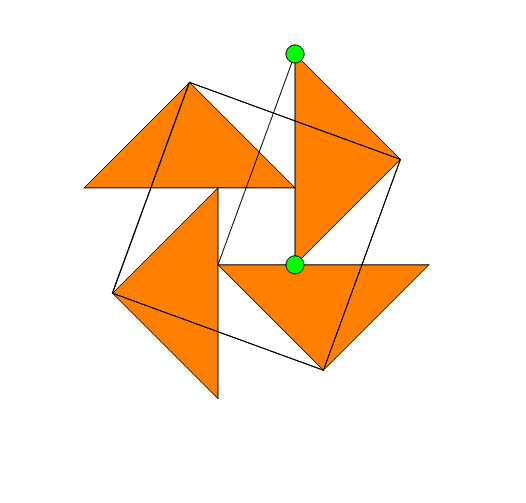
Loading the math board and drawing, please wait…
This example demonstrates the properties of a trapezoid's midsegment by dragging points. It involves core concepts like trapezoids, midsegments, parallel lines, and congruent triangles. Constructed using commands such as Point, OrthogonalLine, Midpoint, Polygon, Intersect, Segment, Circle, and Line. Ideal for middle school and above to explore geometric proofs and properties.
GeoGebra Commands & Parameters
Point(xAxis) → BOrthogonalLine(B, xAxis) → aPoint(a) → CMidpoint(C, B) → DPolygon(B, C, E) → poly1, e, b, cIntersect(xAxis, yAxis) → APolygon(A, B, 4) → poly2, d, f, g, h, F, GSegment(A, F) → iSegment(G, B) → jOrthogonalLine(A, i) → kOrthogonalLine(G, j) → lCircle(A, Segment[C, E]) → pIntersect(p, k, 1) → HOrthogonalLine(H, k) → mOrthogonalLine(F, i) → nCircle(F, Radius[p]) → qCircle(G, Radius[p]) → rIntersect(r, l, 1) → IIntersect(q, n, 2) → JLine(G, A) → sLine(A, B) → tLine(F, G) → a_1OrthogonalLine(J, n) → b_1OrthogonalLine(I, l) → c_1Intersect(b_1, a_1) → KIntersect(s, c_1) → LIntersect(m, t) → MPolygon(F, J, K) → poly3, k_1, f_1, j_1Polygon(G, I, L) → poly4, l_1, g_1, i_1Polygon(A, H, M) → poly5, m_1, a_2, h_1Polygon(I, H, 4) → poly6, d_1, e_1, n_1, p_1, N, OSegment(A, C) → q_1
AI Drawing Prompt Reference
Draw a trapezoid ABCD with AB and CD parallel. Construct the midsegment DE through points B and C. Then, draw a perpendicular line from point A to intersect the midsegment DE at point H. Construct a circle with radius DE centered at point A, and let it intersect the perpendicular line at points I and J. Connect points I and J, and let the line intersect AB at point K and AD at point L. Finally, connect point L to point C, and let the line intersect BC at point M, forming a new trapezoid.
The prompt above was compiled from the original drawing commands and is for reference only.