
Explore Similarity
Loading the math board and drawing, please wait…
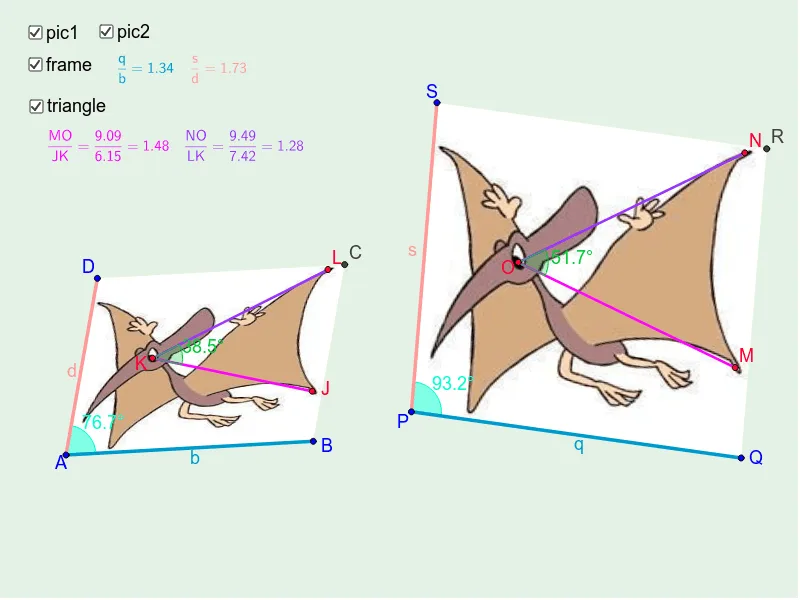
This example demonstrates how to analyze geometric similarity using coordinates and vectors. It involves core concepts like similarity criteria, corresponding parts, vector operations, and coordinate geometry. Construction highlights include commands like Vector, OrthogonalVector, Segment, Angle, Polygon. Suitable for high school mathematics education to understand properties and proofs of similar figures.
GeoGebra Commands & Parameters
Vector(A, B) → uVector(A, D) → vVector(P, Q) → wVector(P, S) → zOrthogonalVector(u) → aOrthogonalVector(v) → b_2Vector(A, K) → cVector(A, L) → hVector(A, J) → i_1Segment(A, B) → d_2Segment(A, D) → eSegment(P, Q) → j_1Segment(P, S) → k_1Segment(J, K) → jSegment(L, K) → lSegment(M, O) → mSegment(N, O) → nAngle(J, K, L) → αAngle(M, O, N) → βPolygon(A, B, C, D) → poly1, a_1, b_1, m_1, c_1Polygon(P, Q, R, S) → poly2, d_1, e_1, n_1, f_1Segment(A, B) → bSegment(A, D) → dSegment(P, Q) → qSegment(P, S) → sAngle(B, A, D) → γAngle(Q, P, S) → δ
AI Drawing Prompt Reference
Draw two quadrilaterals with distinct vertex sets. In the first, take two adjacent sides from one vertex as base vectors, and draw their perpendicular vectors. From another vertex, construct two sides that are parallel or corresponding to the base vectors. Repeat a similar structure for the second quadrilateral but with different vertex positions. In both quadrilaterals, mark two pairs of corresponding angles, and connect certain vertices with segments to form triangles for comparing angle measures and side ratios. The overall figure shows two similar quadrilaterals, with equal angles and proportional sides, illustrating geometric similarity through vector directions and angle congruence.
The prompt above was compiled from the original drawing commands and is for reference only.