
Explore Perpendicular Lines
Loading the math board and drawing, please wait…
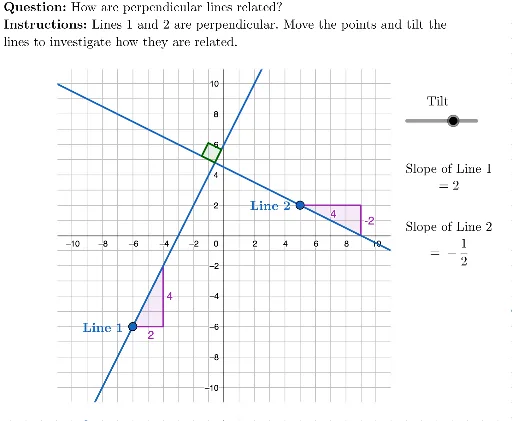
This example demonstrates how to investigate perpendicular lines using GeoGebra, covering concepts like line equations, slopes, Pythagorean theorem, and angle calculations. It utilizes commands such as Element, Polygon, PointIn, Line, OrthogonalLine, Slope, LaTeX, Text, and Angle. Suitable for high school students and teachers to understand the criteria and properties of perpendicular lines.
GeoGebra Commands & Parameters
Element({-5, -4, -3, -2, -1, 1, 2, 3, 4, 5}, m) → actualMPolygon({(-11, -11), (-11, 11), (11, 11), (11, -11)}) → viewBoxPointIn(viewBox) → APointIn(viewBox) → BLine(A, baseLine) → line1OrthogonalLine(B, baseLine) → line2Slope(line1) → slope1LaTeX("\text{Tilt}") → tiltLaTeX("\textbf{Instructions: }Lines 1 and 2 are perpendicular. Move the points and tilt the\\lines to investigate how they are related.") → INSTRUCTIONSLaTeX("\textbf{Question: }How are perpendicular lines related?") → QUESTIONSlope(line2) → slope2Text("\textbf{Line \(1\)}", A + (-3.5, 0.5), true, true) → line1LabelText("\textbf{Line \(2\)}", B + (-3.5, 0.5), true, true) → line2LabelSlope(line2) → slope2multiplier2Slope(line2) → slope2multiplier3Slope(line2) → slope2multiplier4Slope(line2) → slope2multiplier5Angle(line1, line2) → α