
Explore Horizontal and Vertical Translations: GM3-04-P4-ET
Loading the math board and drawing, please wait…
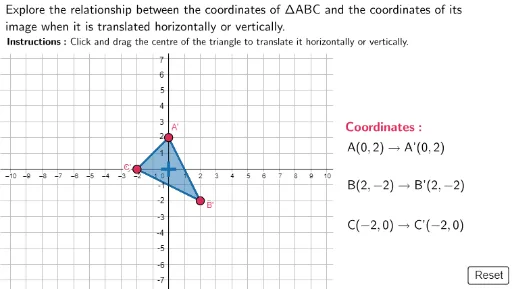
This GeoGebra example dynamically demonstrates horizontal and vertical translations of shapes or functions, showing how translations affect the position of a graph. The core mathematical concept is the translation transformation in plane geometry, involving vectors, coordinate changes, and the overall shifting of figures. Construction highlights include using commands like Polygon, Point, and Segment to build base shapes, and interactive controls such as sliders and arrow indicators (arrowdistc, ArrowTailC, etc.) to visualize the translation direction and magnitude. Suitable for middle or high school students learning geometric transformations or function translations, and useful for teachers to illustrate how points and graphs move under horizontal and vertical shifts.
GeoGebra Commands & Parameters
Polygon((-15, 7.3), (25, 7.3), (25, 15), (-15, 15)) → TopBox, f, g, h, iPolygon((10.4, 15), (25, 15), (25, -15), (10.4, -15)) → RightBox, j, k, l, mPolygon(A, B, C) → ABC, c, a, bJoin({Sequence[(i, 0), i, -8, 8, 1], Sequence[(0, j), j, -5, 5, 1]}) → GridSpacePoint(GridSpace) → AnchorPtPolygon(A1, B1, C1) → ABC1, c1, a1, b1Segment(ArrowTailA, ArrowTailA - (0, 0.5)) → LineA1Segment(ArrowHeadA, ArrowHeadA - (0, 0.5)) → LineA2Segment(ArrowTailA - (0, 0.5), ArrowHeadA - (0, 0.5)) → LineA3Segment(ArrowTailB, ArrowTailB - (0, 0.5)) → LineB1Segment(ArrowHeadB, ArrowHeadB - (0, 0.5)) → LineB2Segment(ArrowTailB - (0, 0.5), ArrowHeadB - (0, 0.5)) → LineB3Segment(ArrowTailC, ArrowTailC - (0, 0.5)) → LineC1Segment(ArrowTailC - (0, 0.5), ArrowHeadC - (0, 0.5)) → LineC3Segment(ArrowHeadC, ArrowHeadC - (0, 0.5)) → LineC2Segment((0, 7.3), (0, -8)) → yaxis
AI Drawing Prompt Reference
Draw a dynamic example of horizontal and vertical translations. Start by drawing two rectangles, one at the top and one on the right. Then use points and segments to draw arrows indicating the direction of translation. Finally, add a y-axis line. By adjusting the length and direction of the arrows, observe the translation effect on the shapes.
The prompt above was compiled from the original drawing commands and is for reference only.