
Explore Geometric Relationships with Dragging Points and Slider
Loading the math board and drawing, please wait…
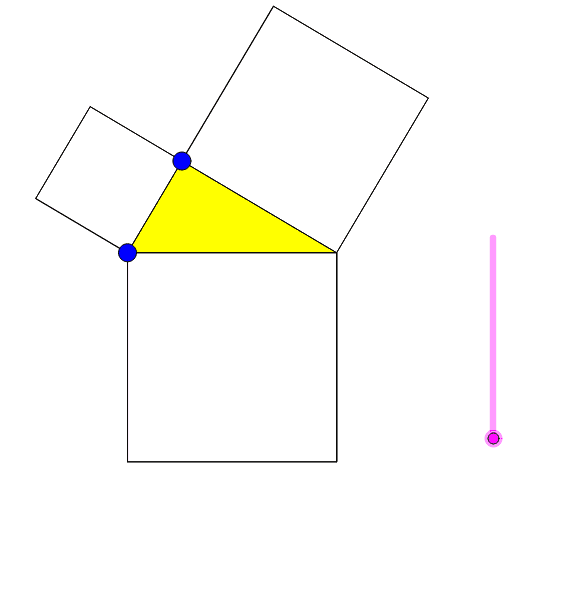
This example demonstrates dynamic geometric relationships by dragging points and a slider, visually showcasing transformations and properties of geometric figures. It involves core mathematical concepts such as triangles, circles, polygons, coordinate geometry, and geometric construction. The construction utilizes GeoGebra commands and objects like Point, Intersect, CircleArc, Polygon, Midpoint, If, Rotate, Dilate, OrthogonalLine, Mirror, and Line. It is suitable for high school students and math enthusiasts exploring geometric transformations, optimization problems, and dynamic geometry demonstrations.
GeoGebra Commands & Parameters
Point(xAxis) → AIntersect(xAxis, yAxis) → BCircleArc(B, D, A) → cPoint(c) → EPolygon(A, E, 4) → poly1, a, b, d, e, F, GPolygon(E, C, 4) → poly2, f, g, h, i, H, IPolygon(C, A, 4) → poly3, j, k, l, m, J, KPolygon(A, E, C) → poly4, c_1, a_1, e_1Midpoint(A, K) → LIf(n < 1, n, 1) → r1Rotate(A, (-(((r1 * 180))°)), L) → A'Rotate(E, (-(((r1 * 180))°)), L) → E'Rotate(C, (-(((r1 * 180))°)), L) → C'Polygon(A', E', C') → poly4', c', a', e'If(1 < n < 2, 2 - n, If[n ≥ 2, 0, 1]) → d1Dilate(C, d1, I) → C'_1Dilate(A, d1, F) → A'_1Polygon(A'_1, E, C'_1) → poly5, c'_1, a'_1, e_2Polygon(E, E', K, C) → poly6, e_3, e'_1, k_1, c_2Polygon(E, A, J, E') → poly7, e_4, a_2, j_1, e'_2If(3 < n < 4, n - 3, 1) → r2Rotate(E, ((r2 * 90))°, A) → E'_1Rotate(A, ((r2 * 90))°, A) → A'_2Rotate(J, ((r2 * 90))°, A) → J'Rotate(E', ((r2 * 90))°, A) → E''Polygon(E'_1, A'_2, J', E'') → poly7', e'_3, a'_2, j', e''OrthogonalLine(L, e_3) → pMirror(C, p) → C'_2Mirror(K, p) → K'If(4 < n < 5, 5 - n, If[n ≥ 5, 0, 1]) → d2Dilate(E, d2, E') → E'_2Dilate(E', d2, E) → E''_1Dilate(C, d2, C'_2) → C'_3Dilate(K, d2, K') → K'_1Polygon(E'_2, C'_3, K'_1, E''_1) → poly8, e'_4, c'_3, k'_1, e''_1If(5 < n < 6, n - 5, 1) → r3Rotate(E'_2, ((r3 * 90))°, A) → MRotate(C'_3, ((r3 * 90))°, A) → NRotate(K'_1, ((r3 * 90))°, A) → ORotate(E''_1, ((r3 * 90))°, A) → PPolygon(M, N, O, P) → poly8', m_1, n_1, o, p_1Line(G, H) → qOrthogonalLine(E, q) → r
AI Drawing Prompt Reference
Draw a dynamic geometric figure with points and a circle arc formed by their intersections on coordinate axes. Generate four quadrilateral polygons based on these points and the arc. Use a slider to control rotation angles and observe transformations. Then, create more geometric shapes using midpoint, rotation, dilation, and reflection to demonstrate geometric transformations and optimization problems.
The prompt above was compiled from the original drawing commands and is for reference only.