
Evaluating Compositions of Trig & Inverse Trig Functions
Loading the math board and drawing, please wait…
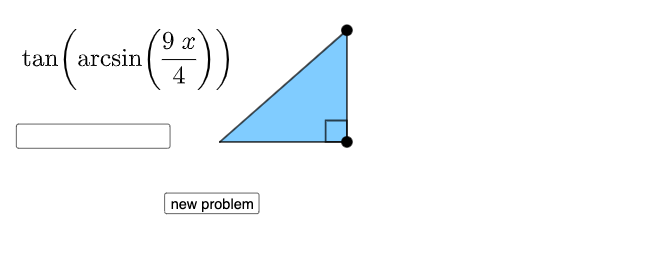
This example demonstrates how to evaluate compositions of trigonometric and inverse trigonometric functions. Key mathematical concepts include trigonometric and inverse trigonometric functions. Using GeoGebra commands such as Random, RandomElement, Sequence, etc., dynamic constructions and displays of these functions' properties are shown. Suitable for high school mathematics education and learning.
GeoGebra Commands & Parameters
Random(1, 6) → aRandom(1, 3) → bRandomElement(nlist) → nSequence(i, i, abs(n), 9, 1) → l1, {4, 5, 6, 7, 8, 9}RandomElement(l1) → cFractionText(d) → text1If(b ≟ 1, asind(d), b ≟ 2, acosd(d), b ≟ 3, atand(d)) → αIf(a ≟ 1, sin(α), a ≟ 6, cot(α), a ≟ 2, cos(α), a ≟ 3, tan(α), a ≟ 4, csc(α), a ≟ 5, sec(α)) → eSurdText(e) → text2If(a ≟ 1, sin(x), a ≟ 6, cot(x), a ≟ 2, cos(x), a ≟ 3, tan(x), a ≟ 4, csc(x), a ≟ 5, sec(x)) → fIf(b ≟ 1, asind(x), b ≟ 2, acosd(x), b ≟ 3, atand(x)) → gIf(a ≟ 1, "sin", a ≟ 6, "cot", a ≟ 2, "cos", a ≟ 3, "tan", a ≟ 4, "csc", a ≟ 5, "sec") → text3If(b ≟ 1, "arcsin", b ≟ 2, "arccos", b ≟ 3, "arctan") → text4Line(A, A + (1, 0)) → mPoint(Ray[A, (1, 0)]) → BPoint(Ray[B, B + (0, 1)]) → CAngle(C, B, A) → βPolygon(A, B, C) → t1, c_1, a_1, b_1Segment(A, B) → pSegment(B, C) → qSegment(C, A) → rRandom(1, 9) → oIf(v ≟ 1, s(x) / n, n / s(x)) → tTextfield(g_1) → InputBox1
AI Drawing Prompt Reference
Draw a right triangle where one acute angle is determined by a randomly chosen inverse trigonometric function (arcsine, arccosine, or arctangent) of a random value, and then apply a randomly chosen trigonometric function (sine, cosine, tangent, cotangent, secant, or cosecant) to that angle. Display the numerical result of this composition as a fraction or radical, and show the corresponding function expression. Also plot the graph of this composite function on a coordinate plane, and include an input box for dynamic parameter adjustment.
The prompt above was compiled from the original drawing commands and is for reference only.