
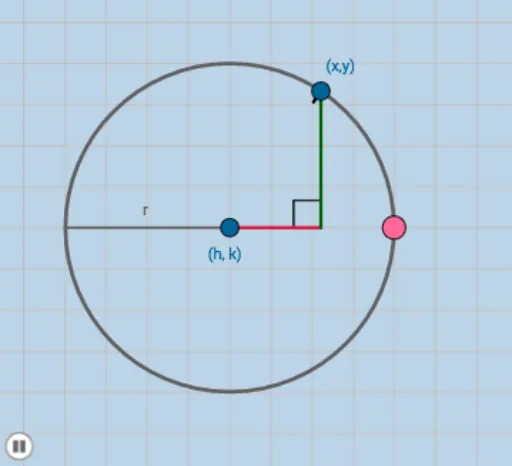
Equation of a Circle via Geometric Construction
Loading the math board and drawing, please wait…
In collections
COORDINATE GEOMETRY
This example demonstrates how the equation of a circle is reflected in a dynamic geometric construction by linking the circle’s boundary to its center and radius determined through measurable constraints. It centers on the key ideas of a circle’s definition (constant distance from the center), the relationship between geometric parameters and the circle equation (standard/general form interpretation), and the use of distance and angle relationships to verify the circle’s position. Construction workflow: create the necessary points, segments, and auxiliary lines; use Circle to generate circles from chosen geometric conditions; apply Intersect to obtain critical intersection points that determine the configuration; use Distance to compute the required lengths (e.g., distances serving as radius/parameter values); employ Dilate together with Ray to adjust or scale constructions when building the circle’s defining elements; use Angle and Polygon to organize angle-based and connected geometric structures that support the final circle characterization. The main GeoGebra commands drawn from the construction summary include Circle, Point, Segment, Intersect, Distance, Dilate, Angle, Polygon, and Ray, along with objects such as A, B, C, D, c, a, b, distanceDC, distanceAD, distanceAC, h, E, F, G and related labeled construction points. Suitable for middle/high school up through early undergraduate coordinate geometry, especially for lessons and practice on understanding and interpreting circle equations through geometry.
GeoGebra Commands & Parameters
Circle(A, B) → cPoint(c) → CSegment(A, C) → gIntersect(a, f) → DSegment(A, D) → dSegment(D, C) → eDistance(D, C) → distanceDCDistance(A, D) → distanceADDistance(A, C) → distanceACDilate(A, If[0 < h ≤ 1, 1 - h, 0], D) → A'Segment(A, A') → iDilate(D, If[1 < h ≤ 2, 2 - h, 0], C) → D'Segment(D, D') → jAngle(C, D, A) → αDilate(C, If[2 < h ≤ 3, 3 - h, 0], A) → C'Segment(C, C') → kPolygon(A, D, C) → poly1, c_1, a_1, d_1Distance(A, B) → lPoint(f) → ERay(A, E) → mPoint(m) → FRay(A, F) → nIntersect(c, f, 1) → GSegment(A, G) → q
AI Drawing Prompt Reference
Draw a circle with center A and radius AB. First, create points A and B, then create circle c through A and B. Create point C on circle c and connect A and C. Create line g through A and C. Find the intersection of line a and f, name it D, and connect A and D, D and C. Measure the distance between D and C (distanceDC), A and D (distanceAD), and A and C (distanceAC). Use D as the center to scale point A, create A', and connect A and A'. Similarly, use C as the center to scale D, create D', and connect D and D'. Measure angle CDA (α), use A as the center to scale C, create C', and connect C and C'. Create a polygon through A, D, and C, connecting A, D, and C. Measure the distance between A and B (l), create line f through A and l, find point E on line f, create ray m through A and E, find point F on ray m, create ray n through A and F. Finally, find the intersection of circle c and line f, name it G, and connect A and G.
The prompt above was compiled from the original drawing commands and is for reference only.