
Equal Area: Parallelogram and Complex Curves
Loading the math board and drawing, please wait…
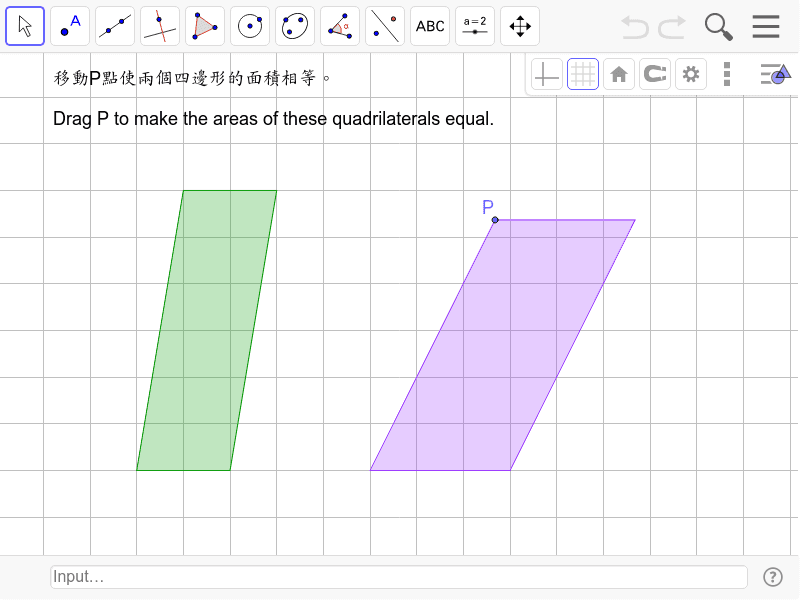
This GeoGebra example demonstrates a dynamic geometric construction exploring equal-area relationships within parallelograms and associated curves. The core mathematical concepts include area equality, parallelogram properties, complex number representation, curve sketching, congruence, and introductory fractal geometry. The construction uses Polygon to create poly1, Circle for circular elements, and Point to define key vertices A, B, C, D, E, F, P, H, I. Segments a, b, c, d, e, g, h, i connect these points, forming poly2, while text1 and text2 display area values or relationships. Suitable for middle school geometry, high school analytic geometry, or undergraduate math labs, this example helps visualize area conservation and geometric transformations interactively.
GeoGebra Commands & Parameters
Polygon(A, B, C, D) → poly1, a, b, c, dCircle(E, F) → ePoint(e) → PPolygon(P, E, H, I) → poly2, g, e_1, h, i
AI Drawing Prompt Reference
Draw a parallelogram with a circle inside. Connect points on the circle and the center to form another polygon. Display area values and relationships dynamically. Start with the parallelogram, add a circle, then connect points to create a new shape, showing area conservation.
The prompt above was compiled from the original drawing commands and is for reference only.