
Ellipse Reflections
Loading the math board and drawing, please wait…
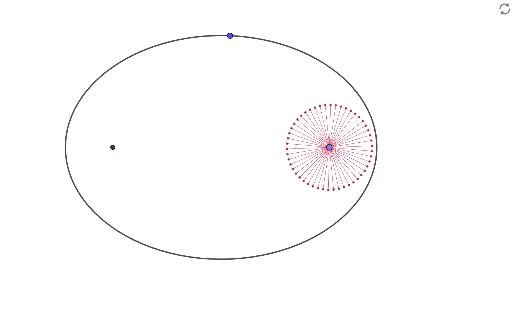
This example demonstrates the reflection of an ellipse. Key mathematical concepts include the geometric properties of ellipses, reflection transformations, and matrix transformations. Using GeoGebra commands such as Point, Ellipse, Segment, and Sequence, multiple reflection lines are constructed to illustrate the reflection properties of the ellipse. Suitable for high school mathematics education and learning.
GeoGebra Commands & Parameters
Point(xAxis) → AEllipse(B, A, C) → cSegment(A, C) → fSequence(Ray[A, Rotate[C, ((2 * π / n) * i), A]], i, 0, n) → L_1Sequence(Intersect[c, Element[L_1, i]], i, 1, n) → L_2Sequence(Segment[A, Element[L_2, i]], i, 1, n) → L_3Sequence(Segment[B, Element[L_2, i]], i, 1, n) → L_4Eccentricity(c) → aSequence(Vector[A, Element[L_2, i]], i, 1, n) → L_5Sequence(Vector[Element[L_2, i], B], i, 1, n) → L_6Sequence(Length[Element[L_5, i]], i, 1, n) → L_7Sequence(Length[Element[L_6, i]], i, 1, n) → L_8Sequence(Vector[Element[L_5, i] / Element[L_7, i]], i, 1, n) → L_9Sequence(Vector[Element[L_6, i] / Element[L_8, i]], i, 1, n) → L_{10}Sequence(If[d < Element[L_3, i], A + (d * Element[L_9, i])], i, 1, n) → L_{11}Sequence(If[d > Element[L_3, i], Element[L_2, i] + ((d - Element[L_3, i]) * Element[L_{10}, i])], i, 1, n) → L_{12}Sequence(If[d > Element[L_3, i], Segment[A, Element[L_2, i]]], i, 1, n) → L_{14}Sequence(Segment[A, Element[L_{11}, i]], i, 1, n) → L_{13}Sequence(Vector[A, Element[L_{11}, i]], i, 1, n) → L_{16}Sequence(Segment[Element[L_2, i], Element[L_{12}, i]], i, 1, n) → L_{15}Sequence(Vector[Element[L_2, i], Element[L_{12}, i]], i, 1, n) → L_{17}
AI Drawing Prompt Reference
Draw an ellipse and demonstrate its reflection properties. Start by creating the ellipse's major and minor axes. Then, construct multiple rays emanating from the center of the ellipse and rotating around it. For each ray, find its intersection with the ellipse and draw line segments from the center to these points. Calculate the vectors for each segment, scale them proportionally, and use these scaled vectors to plot the reflected points on the ellipse. Finally, visualize the reflection process by connecting the original and reflected points.
The prompt above was compiled from the original drawing commands and is for reference only.