
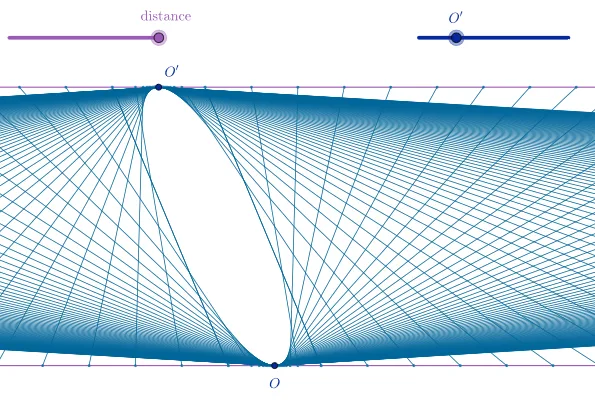
Ellipse as Envelope of Segments
Loading the math board and drawing, please wait…
This example demonstrates the construction of an ellipse as an envelope of segments using the method of correspondence. It involves core mathematical concepts such as the definition of an ellipse, envelope theory, parametric equations, and analytical geometry. The construction utilizes GeoGebra commands like Sequence, shiftO1, d, shiftO2, domain, range, segmDown, domainSmall, rangeSmall, segmUp, horLineUp, horLineDown, O, and O1 to generate points, shift them, draw segments, and trace their locus. It is suitable for high school and above students to understand the geometric construction of ellipses, the concept of envelopes, and the application of parametric equations and analytical geometry.
GeoGebra Commands & Parameters
Sequence((n, (-d)), n, -100, 100) → domainSequence((1 / n + shiftO1, d), n, -100, 100) → rangeSequence(Segment[Element[domain, j], Element[range, j]], j, 1, Length[domain]) → segmDownSequence((1 / n, (-d)), n, -100, 100) → domainSmallSequence((n + shiftO1, d), n, -100, 100) → rangeSmallSequence(Segment[Element[domainSmall, j], Element[rangeSmall, j]], j, 1, Length[domainSmall]) → segmUp
AI Drawing Prompt Reference
Draw an ellipse by showing it as an envelope of segments where the endpoints of each segment move along two concentric circles. First, draw two concentric circles, then draw all segments with one endpoint fixed on the larger circle and the other moving along the smaller circle, forming the ellipse as the envelope.
The prompt above was compiled from the original drawing commands and is for reference only.