
Ellipse and Locus Construction
Loading the math board and drawing, please wait…
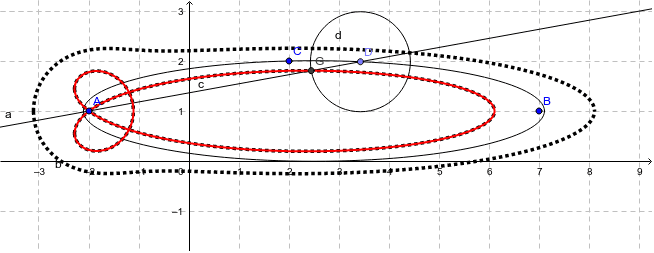
This example demonstrates the construction of complex geometric loci using basic elements like ellipses, points, lines, and circles. It involves core mathematical concepts such as coordinate geometry, geometric construction, locus equations, and trigonometric functions. Key GeoGebra commands and objects used include Ellipse, Point, Line, Circle, Intersect, Locus, and LocusEquation. Suitable for high school and above students to explore geometric construction techniques and understand the formation and properties of loci.
GeoGebra Commands & Parameters
Ellipse(A, B, C) → cPoint(c) → DLine(D, A) → aCircle(D, Segment[E, F]) → dIntersect(d, a, 2) → GLocus(G, D) → loc1LocusEquation(G, D) → b
AI Drawing Prompt Reference
Draw an ellipse and take a point on it. Connect this point to one of the ellipse's foci to form a line. Draw a circle with this point as the center and the line segment connecting this point to another point on the ellipse as the radius. Find the two intersection points of this circle and the line, trace the path of one intersection point as the point on the ellipse moves, and display the equation of the traced path.
The prompt above was compiled from the original drawing commands and is for reference only.